Participating Frequently
March 2, 2018
Answered

Logo in the sand

  • March 2, 2018
  • 2 replies
  • 3312 views

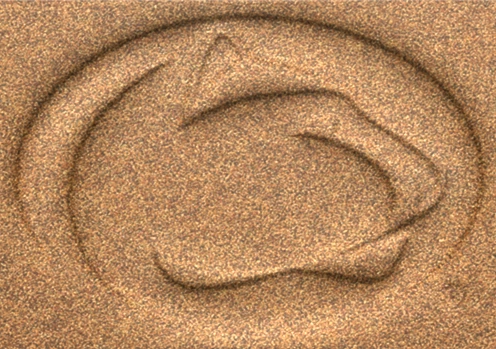
I have seen many videos on how to get the "write on sand" effect and I have even done that once, but I have a request from a customer that is a little different. My customer wants a photo of her logo (which is not writing) in the sand. Wants it to look like the logo was drawn in the sand and then wants imprinted on flip flops. I have uploaded the logo. Does anyone know how to do this or if there are instructions anywhere to do this? Any help would be most appreciative.

    This topic has been closed for replies.
    Correct answer davescm

    There are many ways to to that one of which is to use Photoshops 3D.

    1. Use the image with Filter >3D > Generate normal map and save the resulting map

    2. Take an image of sand and make a 3D extrusion

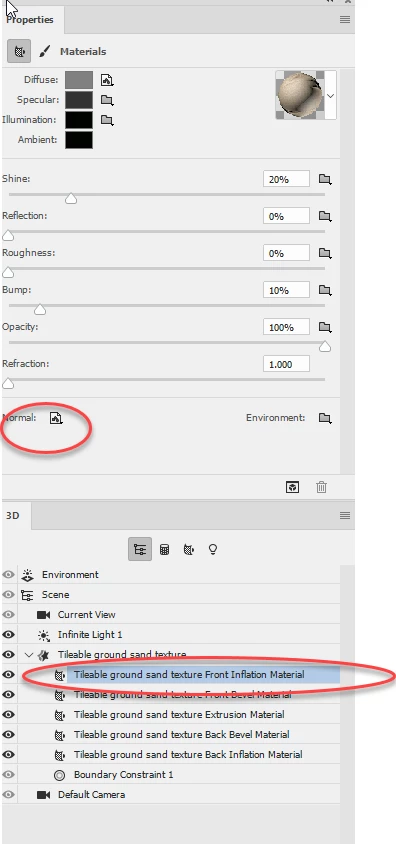
    3. In the properties panel for front extrusion material, click on normal  then Load Texture. Load the map you made above

    4. Adjust the light and render the 3D layer

    Dave

    2 replies

    JJMack
    Community Expert
    Community Expert
    March 2, 2018

    An other way would be to define a custom shape for the logo so you can make it any size.  Then use a Layer style to emboss the logo into the background sand then fill the mold with molten silver and watch it harden and shine.

    JJMack
    davescm
    Community Expert
    davescmCommunity ExpertCorrect answer
    Community Expert
    March 2, 2018

    There are many ways to to that one of which is to use Photoshops 3D.

    1. Use the image with Filter >3D > Generate normal map and save the resulting map

    2. Take an image of sand and make a 3D extrusion

    3. In the properties panel for front extrusion material, click on normal  then Load Texture. Load the map you made above

    4. Adjust the light and render the 3D layer

    Dave

    Participant
    June 14, 2022

    Dave, thanks for the tutorial however I'm REALLY struggling to get this to work. I don't see where I can save "the resulting map" nor load it. Any chance you could screen record this?

    davescm
    Community Expert
    Community Expert
    June 14, 2022

    Unfortunately 3D has been deprecated in Photoshop since I replied in 2018, and no longer works in the new versions. I would now use a separate 3D application and use the logo as a height-map

    Dave