
Participant
March 30, 2021
Question

LOW QUALITY WORKSPACE

  • March 30, 2021
  • 2 replies
  • 689 views

Hi everyone,

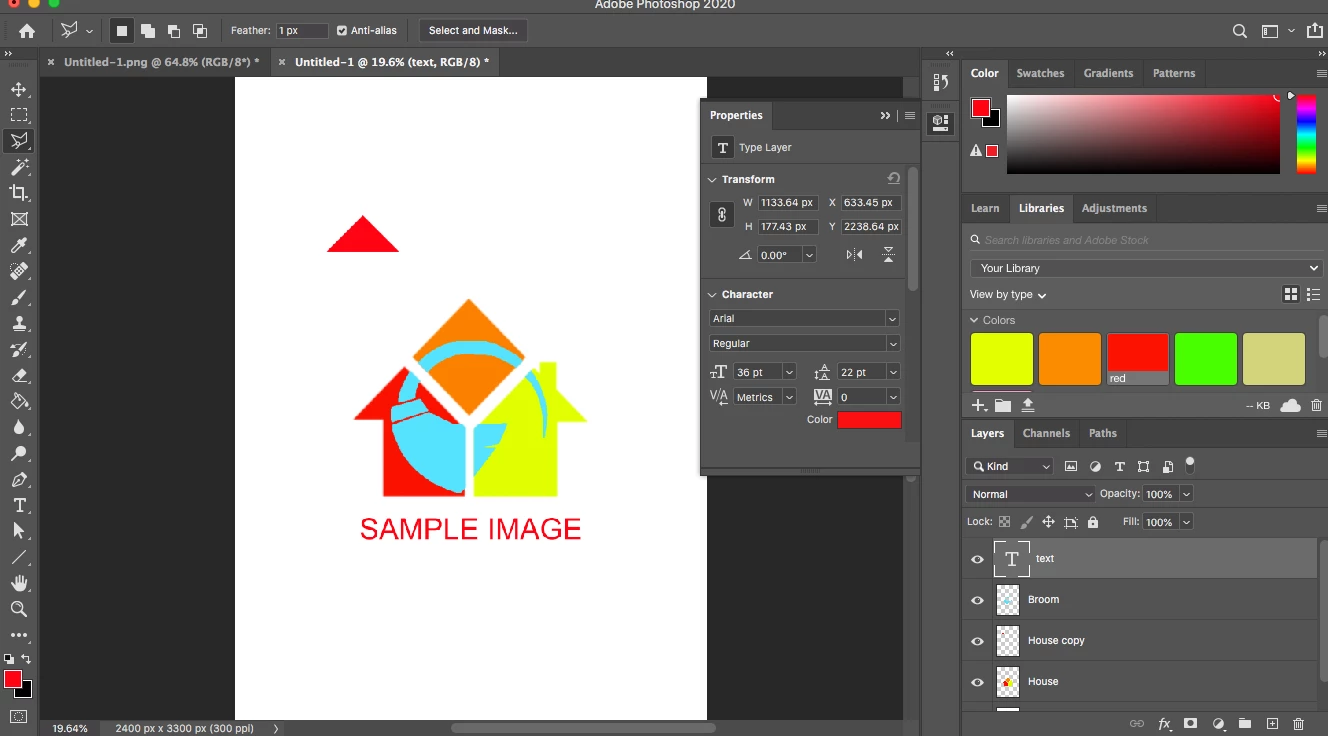
For the last two days, I've been trying to figure out why all of my projects come out with a horrible resolution. In the sample file that I am sharing:


0. This particular document is an 8x11 in @ 300 px/in. and I'm working on a Mac Pro 

1. I used the Polyganol tool

2. Magic Wand

3. The lasso tool

4. Text (Arial Regular, 36 pt, smooth)

5. Anti-alias is checked

6. I'm not even zoomed in. 


Thank you,


This horrible resolution shows up whether I save it as .pds, .jpeg, or a .png. 


This topic has been closed for replies.

2 replies

melissapiccone
Community Expert
Community Expert
March 30, 2021

Your screenshot shows your image at 19% and something. Try viewing at 100%.

Melissa Piccone | Adobe Trainer | Online Courses Author | Fine Artist
LUIS5D24Author
Participant
March 30, 2021

Thanks, but no that doesn't make it better. plus like I said when I save it as a jpg it looks horrible. I'll stick to Illustrator 🙂

D Fosse
Community Expert
Community Expert
March 30, 2021

It would really be very helpful if you could post a 100% screenshot. It could potentially clarify what's happening and help troubleshooting. This isn't just about you! It could be that others have the same problem.


So please, now that you're here with this, take the trouble to make a 100% screenshot.

c.pfaffenbichler
Community Expert
Community Expert
March 30, 2021

Could you please post a screenshot taken at View > 100% with the pertinent Panels (Toolbar, Layers, Channels, Options Bar, …) visible? 


»5. Anti-alias is checked«

For what except the Polygonal Lasso Tool? 


I recommend you start over either in Illustrator right away or at least (in Photoshop) with Shape Layers (created with the Pen Tool, Rectangle Tool, …). 

LUIS5D24Author
Participant
March 30, 2021

Thank you, but no it's not the view. I've tried that. I zoomed out for this one because usually in PS the problem is that people zoom in too much. I'll stick to Illustrator, but it's weird I've never had this issue with PS. 


c.pfaffenbichler
Community Expert
Community Expert
March 31, 2021

I asked you to post a screenshot taken at View > 100%.