


- Home
- Photoshop ecosystem
- Discussions
- Hi I assume you mean the Object Selection Tool, tr...
- Hi I assume you mean the Object Selection Tool, tr...

Copy link to clipboard
Copied
The latest release is 21.0.0. I got it by opening the Creative cloud app and clicking on "Check for updates." Some of the new features are there, the Object selection tool is not.


 1 Correct answer


v21 was released today.
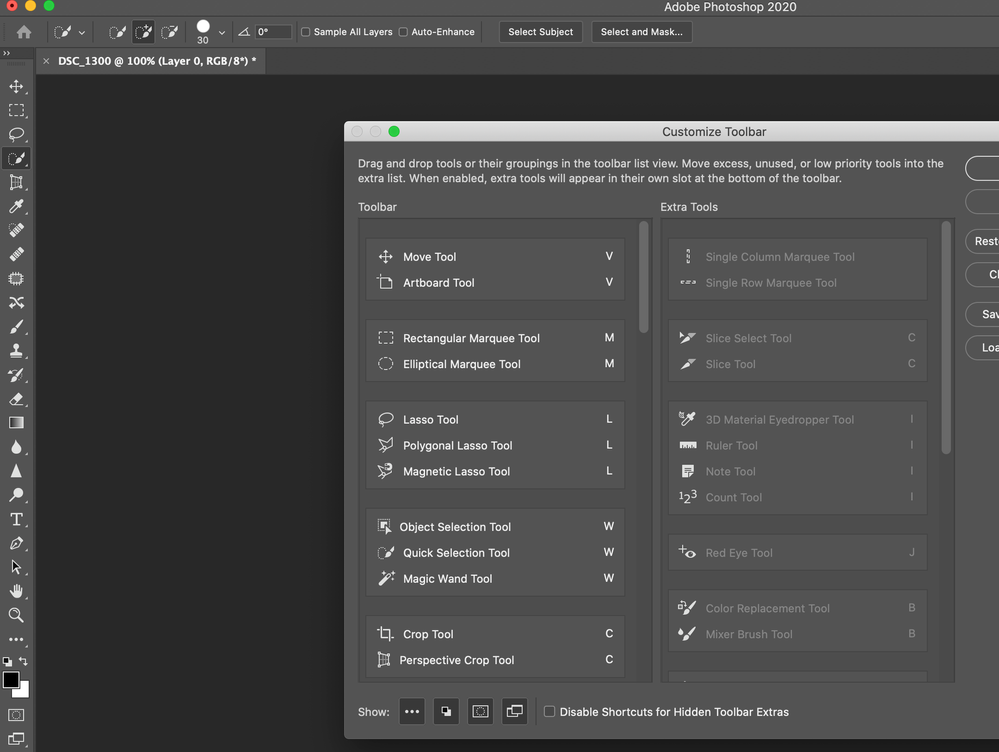
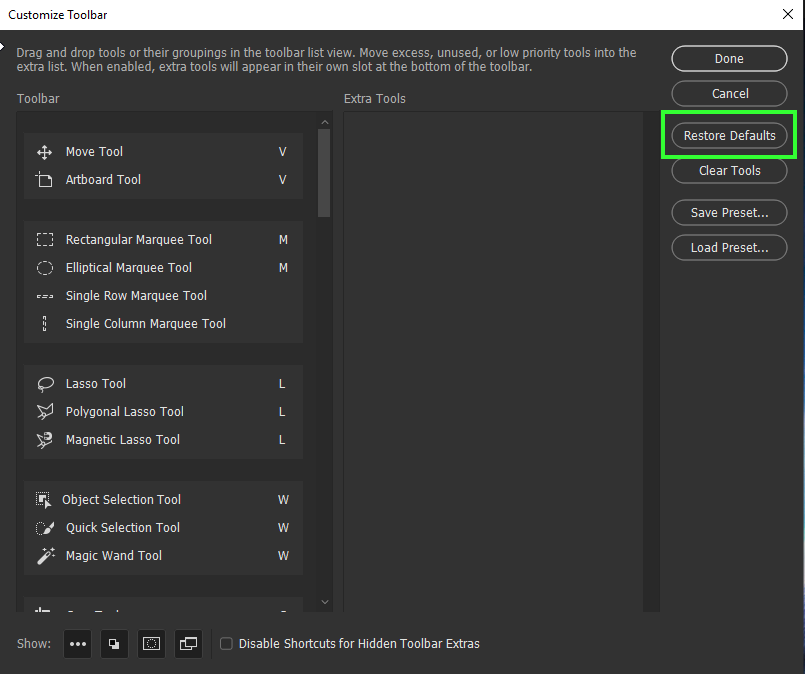
If you have a custom toolbar , the update will not overwrite it. To see the select object tool - click on the three dots in the toolbar (or use Edit>Toolbar) and then Restore Defaults
If you have a custom toolbar , the update will not overwrite it. To see the select object tool - click on the three dots in the toolbar (or use Edit>Toolbar) and then Restore Defaults
If you have a custom toolbar then the update will not overwrite it. To see the object selection tool, go to Ed


Explore related tutorials & articles
 72
Replies
72
72
Replies
72

Copy link to clipboard
Copied
The current version is v21.0.3 not v20.0.8.
Dave


Copy link to clipboard
Copied
Hi There,
Sorry to hear about the experience with Photoshop's latest update. Please have a look at this article to know about what's new: https://helpx.adobe.com/photoshop/using/whats-new.html
Also, the Object Selection Tool should be listed with the other selection tools, you may try resetting the ttool bar and see if it helps. https://helpx.adobe.com/in/photoshop/kb/bringing-back-tools.html
Regards,
Sahil

Copy link to clipboard
Copied
Im upgraded to PS 21.0.0 and the new Object Select Tool is missing from the tool bar. I've gone to Edit>Toolbars and it's there but it doesn't diplay in my workspace. I've tried Restore Defaults and resettng my workspace with no success. What am I missing?
Copy link to clipboard
Copied
Well, now it's there! I feel foolish, but I'm a newbie and am just learning.

Copy link to clipboard
Copied
Did update and the new Object Selection Tool is not available. Went to Tool Bar and did a restore defaults and did a reboot but it is still not available.
{Thread renamed by moderator}
Copy link to clipboard
Copied
Hi there,
Welcome to the Adobe Community!
As the Object Selection Tool is not available in Photoshop, could you please try resetting the Toolbar and let us know if helps? https://helpx.adobe.com/in/photoshop/kb/bringing-back-tools.html
Regards,
Sahil

Copy link to clipboard
Copied
I am having the same problem. Tried the same solutions as Duke_the_Nuke and the object selection tool is not available. Anywhere.
Copy link to clipboard
Copied
And my refine edge tool is brutal. It is so bad it really does not work at all. What is going on??

Copy link to clipboard
Copied
I downloaded the new 2020 Photoshop a couple of hours ago, and my Tools bar is still the old one. I don't have the the new Object Selection tool, and who knows what else is missing. Any word on this glitch??

Copy link to clipboard
Copied
Try clicking on the 3 dots on the tool bar to bring up the tools dialog. Then you can reset it. It might be hidden do to old preferences.

Copy link to clipboard
Copied
\ I have now received the update to 2020 but when selecting I do not have the new option. greeting

Copy link to clipboard
Copied
Hi
I assume you mean the Object Selection Tool, try going to Edit > Toolbar and click on Restore Defaults

Copy link to clipboard
Copied
OPgelost Gr.Peter

Copy link to clipboard
Copied
I don't have the Select Object Tool in the Toolbar (should be with the Quick Selection Tool & the Magic Wand Tool). I have read other posts about finding missing Tools with no luck.
- I just finished updating to Version: 20.0.7 20191017.r.87 2019/010/17: 1208010 x64
- I have reset the Toolbar to default.
Operating System: Windows 10 64-bit
Can anyone shed some light?

Copy link to clipboard
Copied
Have you visited Edit > Toolbar dialogue to reset or you did it in some other way?
Copy link to clipboard
Copied
Yes - Edit>Toolbar. Interestingly, Select Object does not appear in the Customize Toolbar dialogue window, either in the Toolbar list, or the Extra Tools list.
Copy link to clipboard
Copied
Try to click on Restore Defaults even if tool does not appear anywhere.
Copy link to clipboard
Copied
After reading "What's New in Photoshop," I realized that I was missing all of the new features/tools. I ran through the update process, a second time, and now have the Select Object, etc., but now PS crashes every time I try to make a selection. I have submitted a crash report, but I'm hoping someone on the forum can help me figure this out today.
I'm showing a new version number now: Adobe Photoshop Version: 21.0.1 20191106.r.47 2019/11/06: 3152b481f18 x64. Just to make sure that this is the right one, it depicts a child with a teddy bear, gazing out of the window, on the splash screen. The hardware is up-to-date - I'm running PS on a new MSI laptop with 16GB of memory. Very confused, at this point.
Copy link to clipboard
Copied
Try resetting your preferences. By default they are carried forward from the previous version and any corruption can cause issues in a new version.
Dave
Copy link to clipboard
Copied
Thanks for the help. The new tools are now working, after updating, again and resetting preferences. I suspect that my 2.4 connection may have something to do with updating. That being said, the Select>Subject now causes the program to crash, but I can live without it, since the Select Object Tool is so much better.
Copy link to clipboard
Copied
Hi
I have tried all of the suggestions here. I see mention of resetting preferences to default also. I do not see a "reset to defaults" option under Edit>Preferences. Very frustrated as I have a job to finish on deadline and cannot get these tools to show. Thank you!
Copy link to clipboard
Copied
In current versions it is Preferences > General > Reset Preferences on Quit. Then click OK. Then close and restart Photoshop
Dave

Copy link to clipboard
Copied
watch my video, hope it will help


Copy link to clipboard
Copied
Since the current update all the new features are not showing up in the tool bar such as the new one under the quick selection brush. Do I have to activate it somewhere? I'm on a Mac
Thanks

Copy link to clipboard
Copied
Hi
If you mean that you are missing the Object Selection tool, which shares space with the Quick Selection tool, then go to Edit > Toolbar and Restore Defaults for the toolbar (or drag the Object Selection tool into the toolbar.)
https://helpx.adobe.com/photoshop/kb/bringing-back-tools.html
~ Jane


Get ready! An upgraded Adobe Community experience is coming in January.
Learn more
 AdChoices