
Inspiring
September 11, 2018
Answered

Mapping art onto a 3D object

  • September 11, 2018
  • 1 reply
  • 5033 views

I'm just getting started with the 3D features of Photoshop CC. I've created some simple shapes and turned them into 3D objects and used Pillow Inflate preset. I want to map some artwork onto the 3D shapes so that the artwork looks like it is part of the shape -- in the same perspective with the same shading.

I'm not able to find any tutorials that show how to do this. If anyone can explain how to do this or point me to a good tutorial I would really appreciate it.

    This topic has been closed for replies.
    Correct answer davescm

    Hi

    Map your art onto the Diffuse property of the material surface. You can do this by selecting the material in the 3D panel then, in properties, clickling where shown. In the menu that will open, choose - Edit Texture /New Texture /Replace Texture as required

    A psb file will open and you can add your artwork as a new layer. You may need to distort it to match the surface using the UV map as a guide (the lines that appear overlayed on the texture).

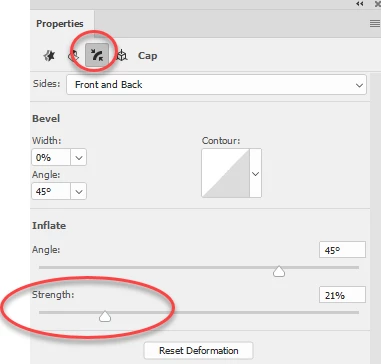
    Rather than using pillow inflate preset - go to the inflation property and set the inflation strength manually. You can then adjust the extrusion depth to get the effect you need.

    As far as tutorials - there are some good ones on Lynda.com. You may also want to take a look at those linked below , which cover the basics. They refer to CS6 but little has changed in 3D since CS6 (CS5 was very different)

    https://design.tutsplus.com/series/using-photoshops-3d-capabilities--psd-18886

    Dave

    1 reply

    Theresa J
    Community Expert
    Community Expert
    September 11, 2018

    Images that map to the surface of a 3D shape is called a material. Search for Photoshop 3D materials and you will probably find some tutorials.

    Inspiring
    September 11, 2018

    Another problem is that I can't extrude the front and back of the shape equally, even though Front & Back is chosen.

    Does anyone know of an in-depth tutorial that covers 3D features in simple step by steps?

    davescm
    Community Expert
    davescmCommunity ExpertCorrect answer
    Community Expert
    September 11, 2018

    Hi

    Map your art onto the Diffuse property of the material surface. You can do this by selecting the material in the 3D panel then, in properties, clickling where shown. In the menu that will open, choose - Edit Texture /New Texture /Replace Texture as required

    A psb file will open and you can add your artwork as a new layer. You may need to distort it to match the surface using the UV map as a guide (the lines that appear overlayed on the texture).

    Rather than using pillow inflate preset - go to the inflation property and set the inflation strength manually. You can then adjust the extrusion depth to get the effect you need.

    As far as tutorials - there are some good ones on Lynda.com. You may also want to take a look at those linked below , which cover the basics. They refer to CS6 but little has changed in 3D since CS6 (CS5 was very different)

    https://design.tutsplus.com/series/using-photoshops-3d-capabilities--psd-18886

    Dave