
JennyBen
Participant
March 17, 2020
Question

Layer Mask in layer panel is always on active in Photoshop

  • March 17, 2020
  • 4 replies
  • 1777 views

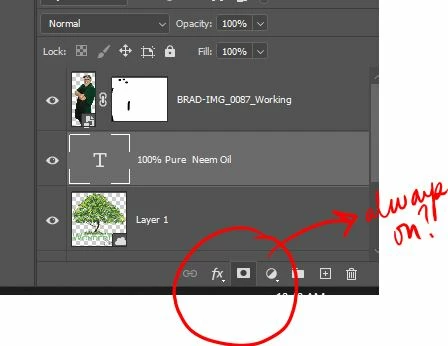
I am working Photoshop CC on windows and the Mask tool in the layer panel is always active but I never see the layer mask. I have to go into Layer>Layer Mask>Reveal All just to see it. And I can't turn it off either. Super frustrating! I just want to be able to click the vector mask icon to create the mask - like I used to. What is going wrong here?


{Thread renamed by moderator}

4 replies

Participant
April 8, 2020

This is happening with me as well. Dragging a layer onto the always active layer mask icon 'fixes' it, but it's clearly a new bug that needs fixed. I'm using Mac OS 10.14.6.

Chuck Uebele
Community Expert
Community Expert
March 18, 2020

Just restarting PS fixed this for me. Seemed like a weird glitch. If a restart doesn't work, I would reset your preferences. 

JennyBen
JennyBenAuthor
Participant
March 17, 2020

Well, I am using Windows 10 and I have the Creative Cloud subscription so it is version 21.1. I have not reset my preferences yet. I'm kinda nervous I'm gonna lost stuff....... 🙂

Sahil.Chawla
Adobe Employee
Adobe Employee
March 17, 2020

Hi there,


That shouldn't be happening, could you please let us know the version of Photoshp and the operating system you're working with?


Could you try resetting the preferences of Photoshop and let us know if it helps?

https://helpx.adobe.com/photoshop/using/preferences.html

Note: Make sure that you back up all your custom presets, brushes & actions before restoring Photoshop's preferences. Migrate presets, actions, and settings

Regards,
Sahil

JennyBen
JennyBenAuthor
Participant
March 17, 2020

Well, I am using Windows 10 and I have the Creative Cloud subscription so it is version 21.1. I have not reset my preferences yet. I'm kinda nervous I'm gonna lose stuff.......