Inspiring
December 11, 2016
Question

match font app

  • December 11, 2016
  • 1 reply
  • 791 views

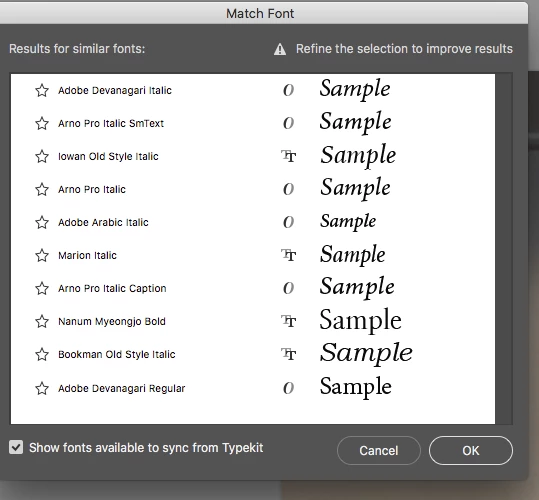
in all the tutorials i've watched there are font's from typekit that show up with a cloud icon next to them.

why don't i get this option when it searches for possible fonts? thanks
This topic has been closed for replies.

1 reply

Barb Binder
Community Expert
Community Expert
December 11, 2016

Are you signed into Typekit? Open it up (Typekit) and check to be sure you are signed in. When I run into this on a student's computer we do a test download with a random font. Once we get that working (which involves various combos of signing in/out) the rest falls into place.

~Barb at Rocky Mountain Training
owenpga2Author
Inspiring
December 11, 2016

Hi Barb,

Yes it appears that i am. i actually selected a font in type-kit and synced it and it showed up in my font library in pscc.

so that seems to work. im just not sure why it doesn't give me fonts off the font-kit library?

thanks

Barb Binder
Community Expert
Community Expert
December 11, 2016

It's not clear to me, either. I checked and the first font on your list (Adobe Devanagari Italic) is available to sync (for me, anyway). Is it available to manually sync it?

What version of PSCC are you on?

~Barb at Rocky Mountain Training
