
niushaj42768137
Participant
December 2, 2017
Question

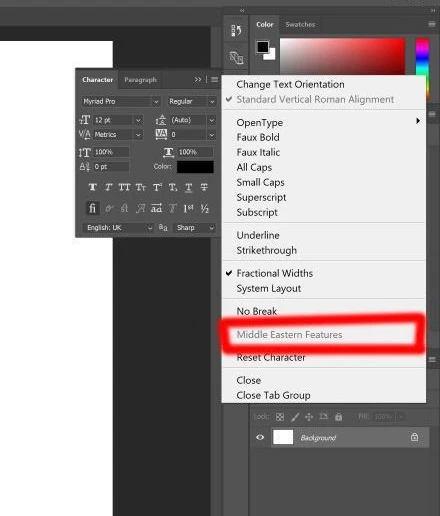
middle eastern feature got disabled!

  • December 2, 2017
  • 1 reply
  • 5341 views

hi.

I'm using Photoshop cc2017. I activated middle eastern from  edit>preferences>type but when I want to activate middle eastern feature from Type tool> character menu it's grayed out and disabled so I cant organize texts from right to left properly.

I DESPERATELY need help. so... if you have any idea please help!
This topic has been closed for replies.

1 reply

Jeff Arola
Community Expert
Community Expert
December 2, 2017

Go to Type>Language Options and click on Middle Eastern Features

Alexa Zinola
Participating Frequently
April 2, 2018

I have the same problem, after selecting Middle Eastern Features, closing and re-opening photoshop, still is greyed out ..

using subscription / last version

Jeff Arola
Community Expert
Community Expert
April 2, 2018

You changed the Text Engine in the photoshop preferences to Middle Eastern, clicked on the Type Tool, went to Type>Language Options and clicked on Middle Eastern Features?