Copy link to clipboard
Copied
Hi Guys,
I'm using photoshop cs5.
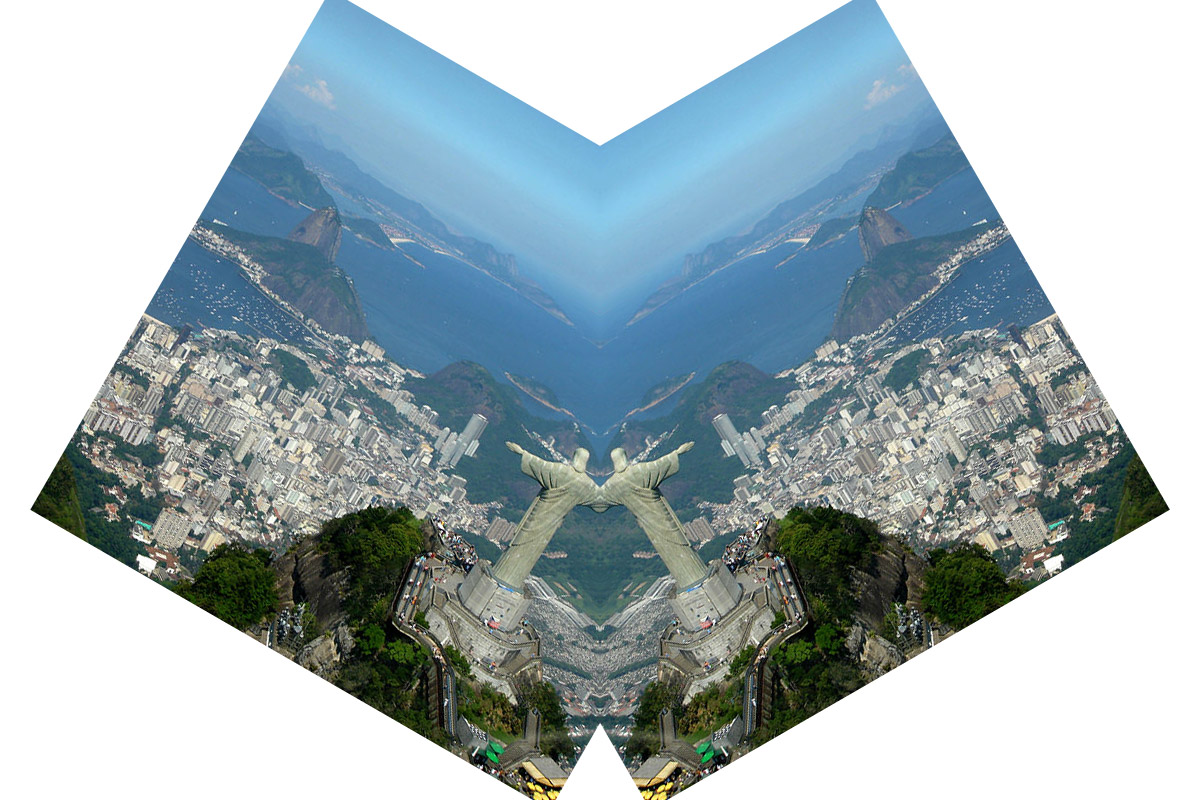
How can I create a mirror from the center of an image, so that any time I move the layer, the mirror reflects the exact opposite?
The only way I have acheived a similar result so far is to write an action where a section of layer 1 and layer 2 are each deleted, and then the two layers move together. However, this doesn't allow for rotation changes or the like.
I've attached 2 images of what it would look like during the process.
Can anyone please help?

Quite possibly a Pixel Bender Filter for something like that exists that could be used as a Smart Filter, but I would recommend to use a more rude Smart Object workaround, although that would not get immediate preview.
• Convert the Layer to a Smart Object
• Convert the Smart Object to a Smart Object
• Duplicate, flip and apply a Layer Mask to hide half the copy
• Open the Smart Object and move, transform, … the contained Smart Object
• On saving the Smart Object the two instances in the contain
...Copy link to clipboard
Copied
Quite possibly a Pixel Bender Filter for something like that exists that could be used as a Smart Filter, but I would recommend to use a more rude Smart Object workaround, although that would not get immediate preview.
• Convert the Layer to a Smart Object
• Convert the Smart Object to a Smart Object
• Duplicate, flip and apply a Layer Mask to hide half the copy
• Open the Smart Object and move, transform, … the contained Smart Object
• On saving the Smart Object the two instances in the containing Document will be updated to reflect those changes

Copy link to clipboard
Copied
Edit: Sorry, I did not get into your request regarding a Script for the task; but while I think a Script should be feasible it might necessitate a dialog (with for example sliders for size, rotation etc.) and not allow for the normal Transform Controls.
And in my opinion a simpler work-around could suffice.
Copy link to clipboard
Copied
Hi mate,
I'm not sure who you are, but you are incredible. This is so helpful.
Whenever you are in Melbourne, Australia, I'll buy you a coffee! Thank you again.
Get ready! An upgraded Adobe Community experience is coming in January.
Learn more