
lippa
Participant
April 25, 2018
Question

Mirror selfies

  • April 25, 2018
  • 6 replies
  • 3280 views

Hello, I was wondering if someone could point me towards a tutorial about how to distribute a more even light on a photo which has been taken using the mirror selfie and flash? im sure it must be out there but I have obviously been using the wrong search terms.

This is an example of what I am talking about :-
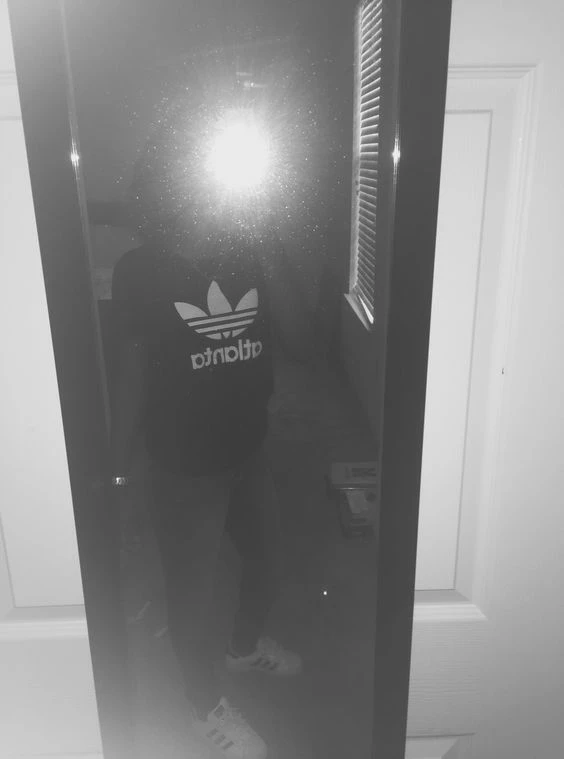

Thanks in advance!

    This topic has been closed for replies.

    6 replies

    Marja de Klerk
    Inspiring
    April 26, 2018

    Hi Lippa,

    Sorry to hear about your loss. Unfortunately there is no way to restore a photo like the one you show here. It is possible though, if there is a little bit of the face visible on the photo. 

    lippa
    lippaAuthor
    Participant
    April 25, 2018

    Thanks for answers, but apologies for not making my question more clear. There are many photos which I wanted to try and clean up which have been taken in a similar way to the example I posted above.This is a common technique that young people use on their social media to hide their face.

    My niece passed away earlier this year and I was hoping I might be able to improve the lighting on several of them so that my sister may have more photos to remember her daughter by. If there is nothing I can do with them, then so be it but thought I would at least look into it.

    Thanks again

    Norman Sanders
    Legend
    April 25, 2018

    I am sorry to read of your loss and wish I could help you but there is no information in the flare area that could be salvaged and not much in the balance of the image to recover.


    Simmer1
    Community Expert
    Community Expert
    April 25, 2018

    Hi Lippa,

    I agree with Giordano - ACP Italytaking it's all cause prevention, so selfies in front of a mirror with the flash on creates too much work to fix.

    Try opening up the blinds if you can and turning the flash off altogether and see how it turns out.

    I hope this helps,

    Sim

    c.pfaffenbichler
    Community Expert
    Community Expert
    April 25, 2018

    What kind is the flash?

    Can you rotate it or place is separately from the camera?

    Marja de Klerk
    Inspiring
    April 25, 2018

    I agree with Giordano. And I think the photo you show here can't be saved.

    You can use the Clone Stamp Tool or the Healing Brush Tool, but only if the reflection spot is smaller and does not cover the face.

    This tutorial shows you how tot do it: Removing Reflections in Photoshop - YouTube .

    magical_Skyline0D4A
    Inspiring
    April 25, 2018

    Having the best natural light (enters from the windows) and you can not absolutely use the flash in front of a mirror.