cvpstudios-89s1Jd
Participant
December 16, 2017
Answered

Modify Keys For Brush Sizes - Photoshop Windows

  • December 16, 2017
  • 2 replies
  • 3576 views

Moved from Mac to Windows, and the biggest pain point I am currently facing is a keyboard/pen shortcut issue for changing brush sizes.

Currently:

Macintosh:

Change brush size: option-ctrl-drag

Change brush edge softness: command-option-ctrl-drag

Windows:

Change brush size: alt-right mouse button drag

Change brush edge softness: shift-alt-right mouse button drag

What I desperately need is for the Windows to be able to let me use Ctrl + Alt and drag (with my pen not mouse) to change brush hardness and size.

The bracket keys are far too slow, and I really need this to work as closely to the way Mac's version does.

Is there any way at all to configure/modify this?

Thanks!
This topic has been closed for replies.
Correct answer JJMack

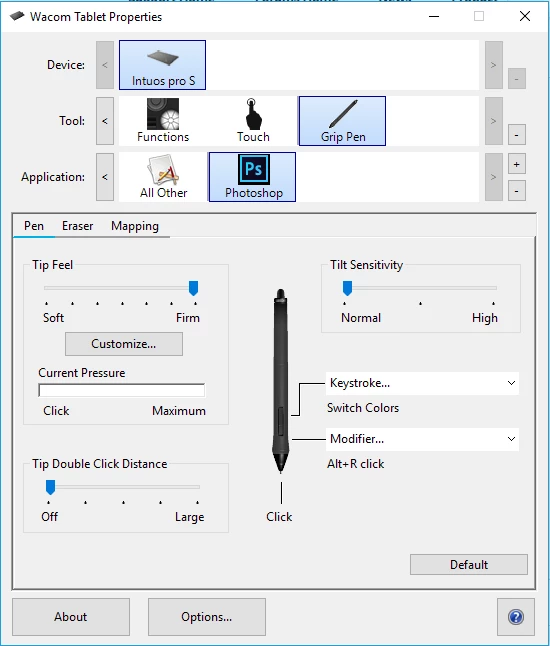
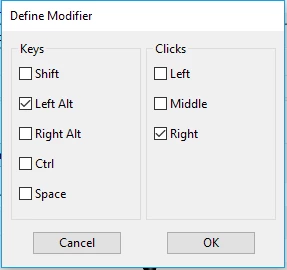
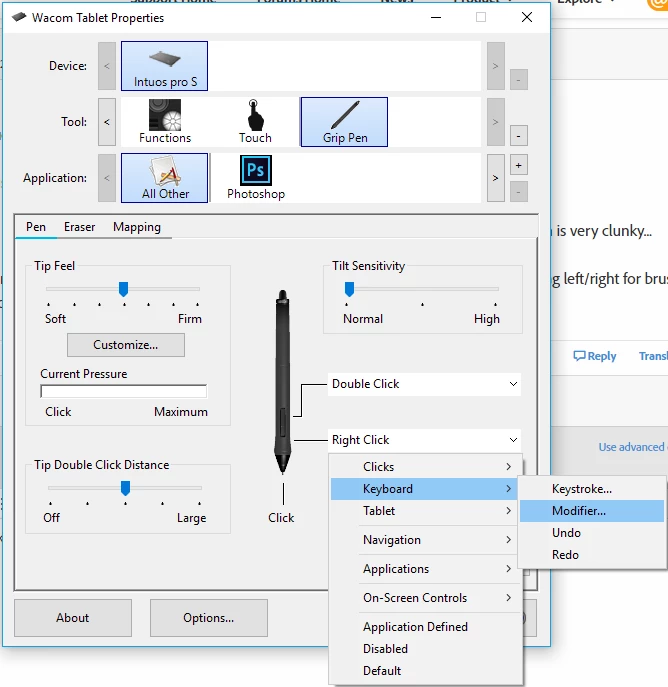
Then don't require the Alt key. Set your Wacom Pen bottom button to Alt+Right Click.

2 replies

JJMack
Community Expert
Community Expert
December 17, 2017

IMO if you are using a brush type tool 8 hours a day you should be using a pen not a mouse.  A pen will cut your paint time way down.  Adjusting the tip size and hardness will not be a problem with a wacom tablet or cintiq.

JJMack
cvpstudios-89s1Jd
Participant
December 17, 2017

I do use a Intuos 4 Pro. I don't use the mouse, that'd be impossible.

The problem is still the same.

Trying to hold the pen slightly off the tablet while holding alt on keyboard and using the pen button is very clunky...

The way it works on Mac is ideal... I hold the keys on the keyboard and touch the pen down and drag left/right for brush size and up/down for hardness.... it's perfect.  

JJMack
Community Expert
JJMackCommunity ExpertCorrect answer
Community Expert
December 17, 2017

Then don't require the Alt key. Set your Wacom Pen bottom button to Alt+Right Click.

JJMack
JJMack
Community Expert
Community Expert
December 16, 2017

I do not know of a way.  If you use a Wacon  Tablet you may be able to set the Pen buttons to what you need.

If not on windows you can set pen's botton button to Alt+Right click  and then all you need do is with the pen closte to the tablet drag up/down or left/right to change brush tip size or hardness.  Easy and quick.

Use Adobe feedback site suggest that option should be added to windows Photoshop. Photoshop Family Customer Community

JJMack
cvpstudios-89s1Jd
Participant
December 17, 2017

Thank you for the reply, Yea I just can't understand how they would have the shortcut on one platform and not on the other, makes no sense. it's a HUGE timesaving ease of use shortcut. It's slowed me down tremendously, not having it.

I really need to find some way to make it work like the mac, or I may have to switch back. This is kinda a dealbreaker since I spend 8 hours a day in PS working on images.