December 18, 2019
Answered

Monitor view and print colors

  • December 18, 2019
  • 6 replies
  • 1154 views

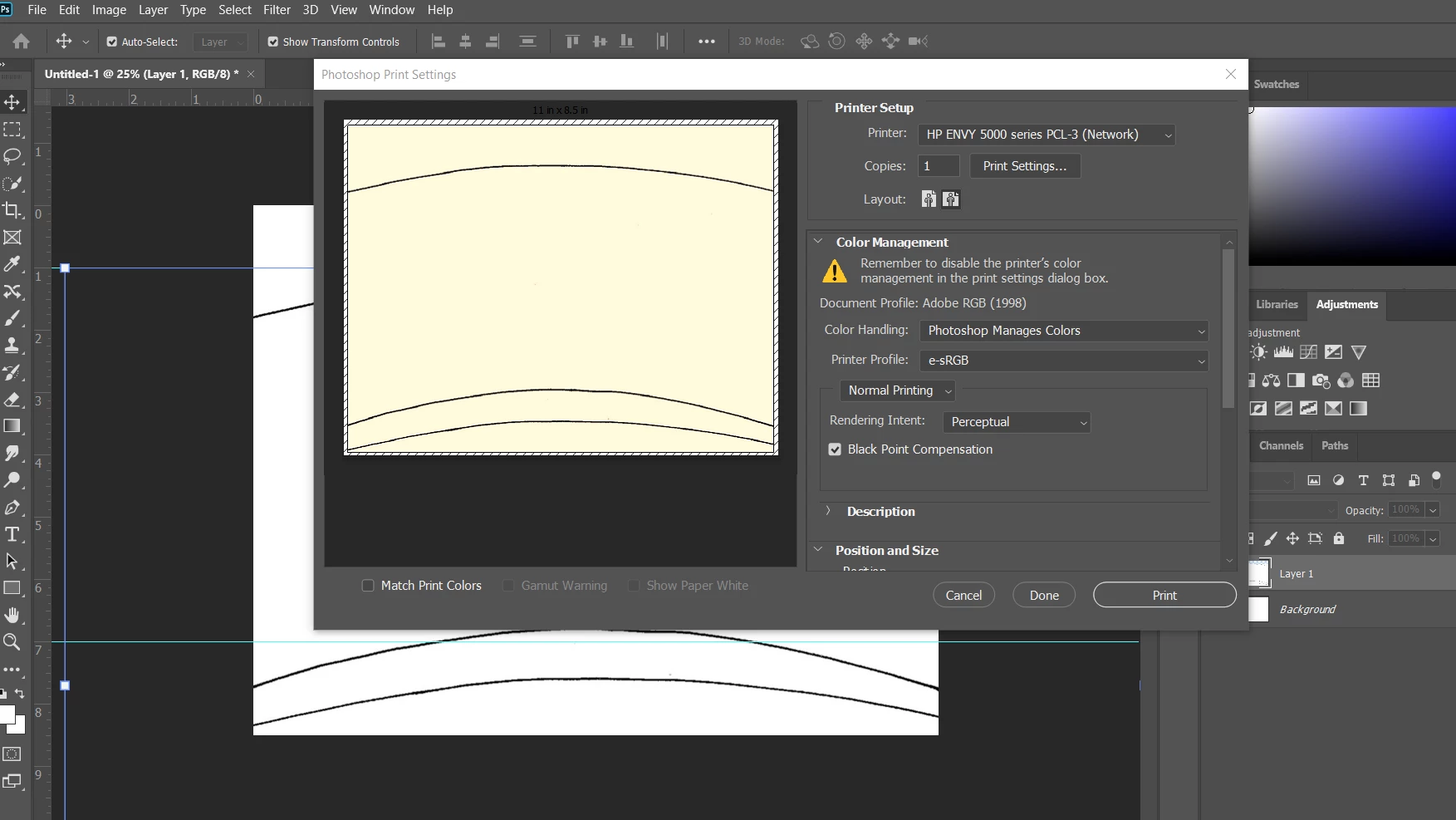
This is making me nuts and I've googled this for hours. I "solved" one issue... When I open PS it automatically goes to this yellow background color. I have to open the Device Manager each time I use PS and uninstall my monitors and use the generic monitor. Ta-da! It works and I have a white background again. BUT THEN WHEN I GO PRINT, the background is yellow again!!! See screenshot. I can't figure out why it's doing this but I always have to export as pdf, import to word and print from that. UGH. 
This topic has been closed for replies.
Correct answer D Fosse

You don't "try" profiles. You use the correct one, end of.


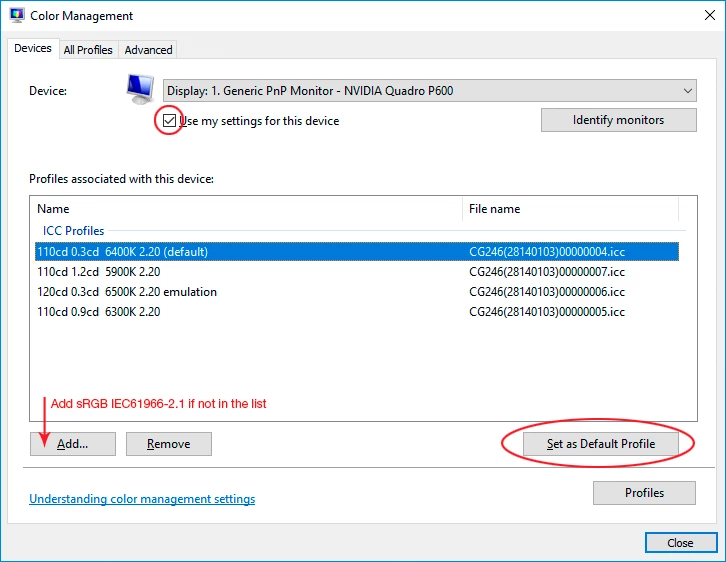
And that also applies to the monitor profile. If you don't have a strictly correct profile, made with a calibrator, you need to use the closest available. That's normally sRGB. Here's the screenshot I promised. Relaunch Photoshop when done:

6 replies

January 8, 2020

Thank you to everyone who gave me answers on this! VERY HELPFUL. For anyone else with this issue, I had to add this profile to ALL displays (with the drop down on the top). 

NB, colourmanagement
Community Expert
Community Expert
December 19, 2019

Hi

you've had some great advice and info here,

I think the display profile is broken (corrupted)  too.


I would test the display appearance with a known test image because you may have inadvertently altered your own files and 'spolied' the appearance.

Try this one as it contains skintone and mono, great memory colours - i.e. you can TELL when they are way off.

CMnet Pixl AdobeRGB testimage  copyright PixlAps & Neil Barstow 2004 / colourmanagement.net (zip file, 1 MB)


Next you must try setting sRGB as the display profile - that will rule out display profile issues. 

However, IF your display were wide gamut type then sRGB would make it look incorrect, in that case try Adobe RGB as the screen profile. 

Using a working color space as display profile is only a temporary solution to rule out display profile issues, you really need a profile made for your own display and for that you need a calbrator such as i1 display pro or spyder. 


And yeah, to print accurately you need a profile specifically for the printer/inks/paper you are using. 


I hope this helps


neil barstow, colourmanagement.net

[please do not use the reply button on a message in the thread, only use the one at the top of the page, to maintain chronological order]


D Fosse
Community Expert
D FosseCommunity ExpertCorrect answer
Community Expert
December 18, 2019

You don't "try" profiles. You use the correct one, end of.


And that also applies to the monitor profile. If you don't have a strictly correct profile, made with a calibrator, you need to use the closest available. That's normally sRGB. Here's the screenshot I promised. Relaunch Photoshop when done:

davescm
Community Expert
Community Expert
December 18, 2019

Dag replied while I was typing with a much more concise explanation 🙂

Dave

D Fosse
Community Expert
Community Expert
December 18, 2019

Gotcha this time 🙂


davescm
Community Expert
Community Expert
December 18, 2019

It sounds like you have a broken monitor profile that does not describe your specific monitor. Don't unplug the monitors, look in Windows Settings at the profile being used for your monitor. If you have monitors that are not wide gamut, then temporarily set the monitor profile to sRGB in Windows>Settings>System>Display>Advanced Display Settings>Display Adapter Properties>Color Management.

The proper way though is to use a hardware device to calibrate your monitors.


Your screenshot shows another issue. e-sRGB is not a printer profile, it is a rarely used colour space profile. The printer profile is specific to your printer, paper and ink combination.


This may help with some explanation :

Digital images are made up of numbers. In RGB mode, each pixel has a number representing Red, a number representing Green and a Number representing Blue. The problem comes in that different devices can be sent those same numbers but will show different colours. To see a demonstration of this, walk into your local T.V. shop and look at the different coloured pictures – all from the same material.

To ensure the output device is showing the correct colours then a colour management system needs to know two things.

1. What colours do the numbers in the document represent? 
This is the job of the document profile which describes the exact colour to be shown when Red=255 and what colour of white is meant when Red=255, Green = 255 and Blue =255. It also describes how the intermediate values move from 0 through to 255 – known as the tone response curve (or sometimes “gamma”).
Examples of colour spaces are (Adobe RGB1998, sRGB IEC61966-2.1)
With the information from the document profile, the colour management system knows what colour is actually represented by the pixel values in the document.

  1. What colour will be displayed on the printer/monitor if it is sent certain pixel values?
    This is the job of the monitor/printer&paper profile. It should describe exactly what colours the device is capable of showing and, how the device will respond when sent certain values.
    So with a monitor profile that is built to represent the specific monitor (or a printer profile built to represent the specific printer, ink and paper combination) then the colour management system can predict exactly what colours will be shown if it sends specific pixel values to that device.

    So armed with those two profiles, the colour management system will convert the numbers in the document to the numbers that must be sent to the device in order that the correct colours are displayed.

So what can go wrong :

  1. The colours look different in Photoshop, which is colour managed, to the colours in a different application which is not colour managed.
    This is not actually fault, but it is a commonly raised issue. It is the colour managed version which is correct – the none colour managed application is just sending the document RGB numbers to the output device regardless without any conversion regardless of what they represent in the document and the way they will be displayed on the output device.

  2. The colour settings are changed in Photoshop without understanding what they are for.
    This results in the wrong profiles being used and therefore the wrong conversions and the wrong colours.
    If Photoshop is set to Preserve embedded profiles – it will use the colour profile within the document.

  3. The profile for the output device is incorrect.
    The profile should represent the behaviour of the device exactly. If the wrong profile is used it will not. Equally if the settings on the device are changed in comparison to those settings when the profile was made, then the profile can no longer describe the behaviour of the device. Two examples would be using a printer profile designed for one paper, with a different paper. A second example would be using a monitor profile but changing the colour/contrast etc settings on the monitor.
    The monitor profile is set in the operating system (in Windows 10 that is under Settings>System>Display >Advanced) which leads to a potential further issue. Operating system updates can sometimes load a different monitor profile, or a broken profile, which no longer represents the actual monitor.


Colour management is simple to use provided the document profile is correct, always save or export with an embedded profile, and the monitor/printer profile is correct. All the math is done in the background.


I hope that helps


Dave

December 18, 2019

I forgot to say I tried ALL the printer profiles. This is just the one that was up for the screenshot. 🙂 

D Fosse
Community Expert
Community Expert
December 18, 2019

You have a broken monitor profile.


The correct way to deal with this is to use a calibrator to make a new profile, but if you don't have one, use sRGB IEC61966-2.1 for now. You do this is Windows Color Management (not at my workstation right now, will post a screenshot later).


Turn on Match Print Color in the Print dialog. Also - e-sRGB has no business as print profile. You need to use the correct profile for your printer/paper/ink. These profiles should be installed along with your printer driver.


e-sRGB is an early and now obsolete attempt at a wide gamut profile. It is not used anymore. In fact, e-sRGB is a strange beast that should be avoided at all costs. It clips black and white points and will destroy your files.

December 18, 2019

I forgot to say I tried ALL the printer profiles. This is just the one that was up for the screenshot. 🙂