
Participant
October 6, 2017
Answered

Moving Photoshop actions to a new computer

  • October 6, 2017
  • 4 replies
  • 900 views

I am trying to move my actions to a new computer. I have followed the instructions here Migrate presets, actions, and settings https://helpx.adobe.com/photoshop/using/preset-migration.html

But when I go to Export/Import Presets none show up.

I am also not able to save my actions and I cannot find them through finder on my Mac

Any tips on what to do would be appreciated

Thanks
This topic has been closed for replies.
Correct answer Stephen Marsh

That is my preferred method Martin, at least one has a “hard copy” of the individual action sets!

Relying on PSP files and or migration assistants are often problematic for many users.

4 replies

Martin_Bns
Inspiring
October 6, 2017

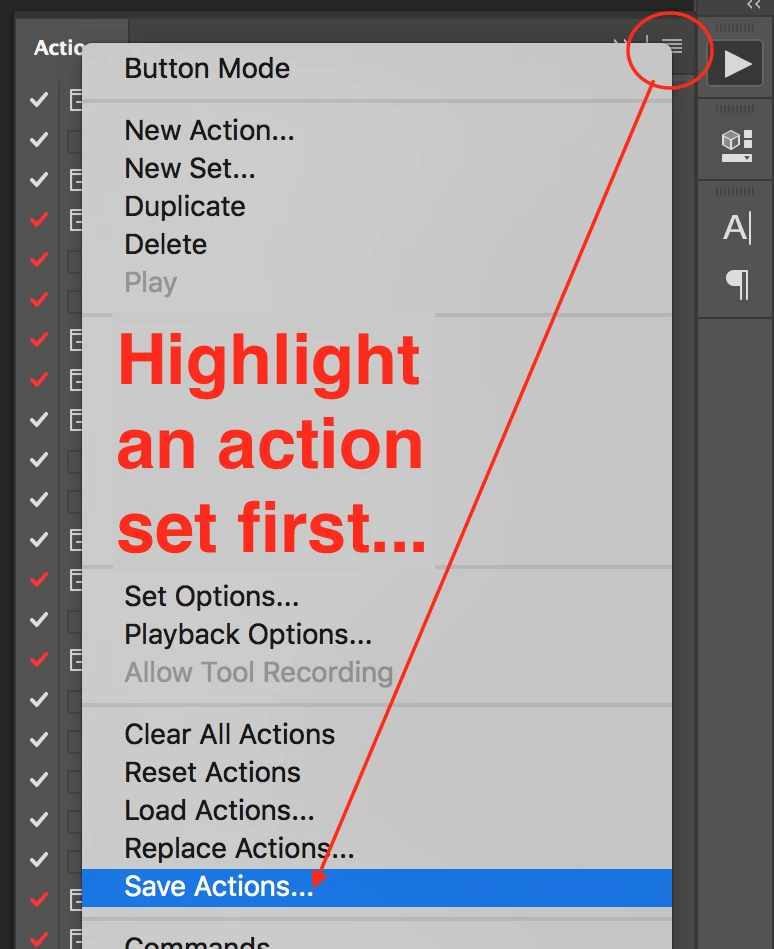
Hi, if you are not a tech person like me, you can save your actions and load them on the new system or any other computer as you wish from the small menu in the upper right corner in the action palette.

Regards,
Martin

Stephen Marsh
Community Expert
Stephen MarshCommunity ExpertCorrect answer
Community Expert
October 7, 2017

That is my preferred method Martin, at least one has a “hard copy” of the individual action sets!

Relying on PSP files and or migration assistants are often problematic for many users.

Stephen Marsh
Community Expert
Community Expert
October 6, 2017

All is covered here:

https://prepression.blogspot.com/2017/01/photoshop-custom-action-file-backup.html

Please let the forum know if you have further questions.

AxelMatt
Community Expert
Community Expert
October 6, 2017

Moved from Lightroom forum to Photoshop

Axel

My System: Intel i7-8700K - 64GB RAM - NVidia Geforce RTX 3060 - Windows 11 Pro 25H2 -- LR-Classic 15 - Photoshop 27 - Nik Collection 8 - PureRAW 6 - Topaz Photo AI
johnrellis
Legend
October 6, 2017

You've posted in the Lightroom forum. Please repost in the Photoshop forum: Photoshop General Discussion