June 21, 2016
Answered

MSVCP140.dll is missing error after CC 2015.5 install | Windows

  • June 21, 2016
  • 5 replies
  • 21584 views

Well just installed PS CC2015.5 and tried to open the app and got this error
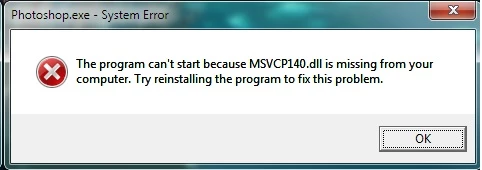
Seems to be nothing but hassle updating PS these day's

This topic has been closed for replies.
Correct answer

Well I finally got it sorted the issue for me was obviously Visual Studio 2015 C++ and when trying to re-install I kept getting this error massage
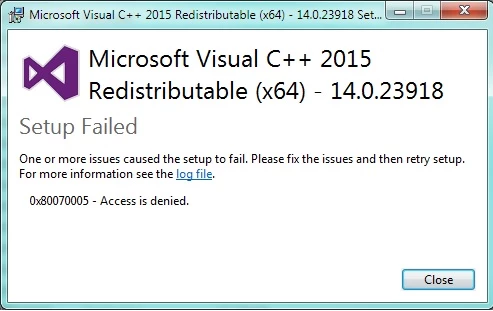
So decided to boot into safe mode and try to re-install Visual Studio 2015 C++ and it work, re-installed fine, rebooted the PC and PS CC2015.5 is now opening fine. So if anybody has this issue hopefully this will help you!

I just also like to say a big thanks to all the people that provided help with this over the last 2 days and a special thanks to Pete Green

5 replies

Participant
February 22, 2024
Correct answer
June 22, 2016

Well I finally got it sorted the issue for me was obviously Visual Studio 2015 C++ and when trying to re-install I kept getting this error massage

So decided to boot into safe mode and try to re-install Visual Studio 2015 C++ and it work, re-installed fine, rebooted the PC and PS CC2015.5 is now opening fine. So if anybody has this issue hopefully this will help you!

I just also like to say a big thanks to all the people that provided help with this over the last 2 days and a special thanks to Pete Green

June 21, 2016

Well surprise that didn't work

Here's my system info

Exactly what log file do you need is it the install.log

Five hours wasted so far on this update, not good at all

Pete.Green
Community Manager
June 21, 2016

Hi Ged,

Can you try installing this "update 2" package? Download Microsoft Visual C++ 2015 Redistributable Update 2 from Official Microsoft Download Center

Let us know if that update helps.

Regards

Pete

June 21, 2016

Hi Pete

That update was already installed

June 21, 2016

Thanks

PC is up to date and I tried installing MS C++ and it tells me it's already installed

Participating Frequently
June 21, 2016

Thanks for the update.

I have sent you a PM so that you can share the logs for further assistance.

June 21, 2016

Thanks Chetna

I've just uninstalled CC and reinstalling at the moment, have removed all traces of CC so will report back once I have it installed again

Cheers

Participating Frequently
June 21, 2016

Hi Ged,

Make sure all Windows updates are done and install Microsoft Visual C++ for Visual Studio 2015 from this link:

Download Visual C++ Redistributable for Visual Studio 2015 from Official Microsoft Download Center 

Also, restart the machine after these updates and then, check.

Regards

Chetna