
Inspiring
April 8, 2021
Question

Need Tutorial: How to make a complex rectangle shape with anchor points?

  • April 8, 2021
  • 2 replies
  • 888 views

I want to create a shape like this. Each black dot represents an anchor point. Unfortunately, making a shape like this is not an intuitive process in photoshop. 
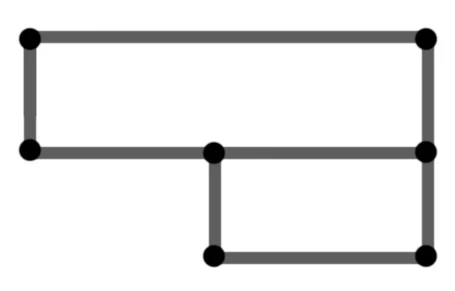
Then I want to use the Direct Selection Tool to select each anchor point and resize the shape in various ways.  


Can someone show me a tutorial that explains how to make the above shape in photoshop with anchor points? Or perhaps you can explain how to do it?

This topic has been closed for replies.

2 replies

Bojan Živković11378569
Community Expert
Community Expert
April 8, 2021

If you plan to colorize later each shape differently then draw them on separate layers because you can not use two different fills on the same shape layer.

Trevor.Dennis
Community Expert
Community Expert
April 8, 2021

I'm wondering if there would be any advantage in combining them into a Smart Object.  You'd still be working with two layers when editing, but would have one for storing.  I do that for things like client sponsor logos that I can keep in named CC Libraries.

Chuck Uebele
Community Expert
Community Expert
April 8, 2021

The shape has to be two separate shapes, but they can be on one layer. I would create guide lines for where you want the lines of the retangles to be. They draw one rectangle with the pen tool. Select the combine shapes mode for the pen tool, then draw the second rectangle, starting on a corner not touching the other rectangle. If you edit this shape, it will still be two rectangles, and the anchor point that connects the top left anchor point of the bottom rectangle will not edit the top rectangle, if you move it.