
Inspiring
February 16, 2020
Question

negative to positive strange results

  • February 16, 2020
  • 6 replies
  • 5257 views

Hi

I want to scan some negatives and convert them to positives and when I looked at YouTube tutorials it seems to be an easy conversion that used adjustment > invert but when I  did it I got this.
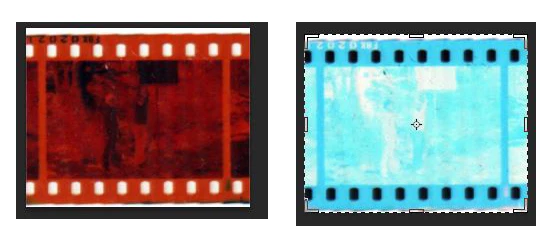
 

I realize it that this is not a regular negative, what is it and how do I convert it?

This topic has been closed for replies.

6 replies

MSjkmailAuthor
Inspiring
February 21, 2020

Just an explanation for anyone interested in what that negative is.


After doing some research I found out it is called an internegative which is "the second negative of an image made from the original negative" which is used in the motion film industry. In 1979 I had done some work in the movies which completely slipped my mind.


Here is some more information in case anyone is interested.

https://en.wikipedia.org/wiki/Internegative

Chuck Uebele
Community Expert
Community Expert
February 22, 2020

Oh, God! those are horrible! I've had to print those in the darkroom, and they always looks off, to me.

davescm
Community Expert
Community Expert
February 16, 2020

An invert adjustment followed by a curve gives a good starting point. For the curve set the blackpoint with the eyedropper to the mask colour (sampled from around the edge). If there is a known white, set the white to that - then tweak and crop as required.

It is important though to start with a well exposed negative and a scanner capable of cutting through the density.


Dave

Per Berntsen
Community Expert
Community Expert
February 16, 2020

Try using a Curves adjustment layer with the Color Negative preset.

This preset does a reasonably good job, but some tweaking is usually required.


Chuck Uebele
Community Expert
Community Expert
February 16, 2020

Color negatives are difficult, as they have an orange mask that varies with density, and was used so a lot of filtration didn't have to be used in the enlarging process. From the scan, it looks like you underexposed your scan, as the invers is much to light and washed out. How are you scanning the negs: actual scanner or shooting them with a camera? Cheaper scanners also have a very limited gamma range, so if your original neg is over exposed, which it looks like from the scan, the scanner may not be able to make a scan light enough to compensate. Most scanners that can scan negs also come with software that converts the image. Doing so in PS isn't easy.

Jeff Arola
Community Expert
Community Expert
February 16, 2020

Can you post a higher resolution sample?


Anyhow,


  • Use Layer>New Adjustment Layer>Levels
  • Select the "White Point" eyedropper:


  • click in an area near the sprocket holes that is the "base" orange colour to remove the orange cast.
  • Use Layer>New Adjustment Layer>Invert to invert the image.


lambiloon
Community Expert
Community Expert
February 16, 2020

Hi check this following video hope it helps you.....Regards

https://youtu.be/LXuwnt5ba8M

Ali Sajjad / Graphic Design Trainer / Freelancer / Adobe Certified Professional
MSjkmailAuthor
Inspiring
February 16, 2020

Thank you but as I stated at the bottom of the post it is not a regular negative. I'm not really sure what format it is and when I find out I will hopefully be able to change it into a positive.

Silkrooster
Legend
February 16, 2020

I have seen similar posts in past. Trying to recall what it was. I have an inkling it was like kodachrome or similar. If I recall is has to do with the green color being shifted. 
What you could try is do a normal invert the apply a gradient map to it. Other than that, someone else will have to chime in. Never had the experience working with it myself.