

The_Mage
Known Participant
May 29, 2020
Answered

No tool or presets designed for current tool

  • May 29, 2020
  • 1 reply
  • 1453 views

I am completely confused. I want to change some colors in an image I created, and my tools are giving me some strange error.


The eyedropper tool, and the paint bucket tool both list no tool or presets designed for the current tool. The paint bucket lists itself as the 3D material drop tool. I did follow along with a video designing 3d text, so not sure if that affected anything. I didn't use either one of those tools while I was following along with that and don't remember making any changes to any settings. other than affecting the layers.


Both have an image of a crossed-out circle. Instead of the normal icon. 


BTW I seem to have at least 2 photoshops on my system. 21.1.3 is having this issue, but 20.0.9 seems to be working. I still don't know why I have both on my system, but they appear with the Creative Cloud desktop. Interestingly I also have Photoshop 2019, not sure of the version, but it comes up with a silver interface where the normal one is black. That one popped up when I selected Photoshop from a dropdown list of options when I chose what to use to open an image.


I figured I would ask before removing it from my system and reinstalling it. I never switched from any default settings.


BTW, I am on a Windows 10 Pro, 64-bit operating system, up to date as far as I know.
This topic has been closed for replies.
Correct answer jane-e

Hi

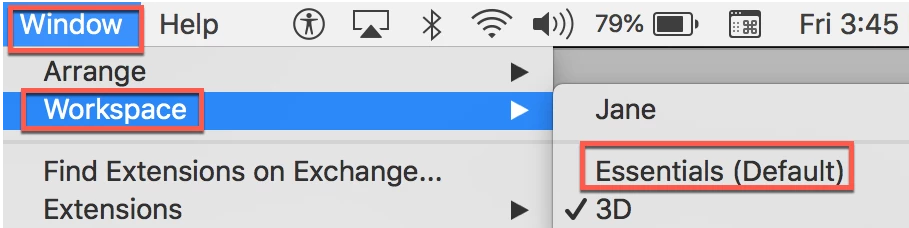
 The first thing to do is go to Window > Workspace and switch from 3D to Essentials. Go backto Window > Workspace and Reset the current workspace. Then come back and tell us if you still have the other issues.


As for previous versions, they can be uninstalled from the creative cloud app. It's best to uninstall newest to oldest, then reinstall. A lot of us keep older versions, though, in case a feature doesn't work in a newer version.


As for "silver" vs. black, there are four interfaces to choose from. Go to Preferences > Interface  > Appearance.


~ Jane

1 reply

jane-e
Community Expert
jane-eCommunity ExpertCorrect answer
Community Expert
May 29, 2020

Hi

 The first thing to do is go to Window > Workspace and switch from 3D to Essentials. Go backto Window > Workspace and Reset the current workspace. Then come back and tell us if you still have the other issues.


As for previous versions, they can be uninstalled from the creative cloud app. It's best to uninstall newest to oldest, then reinstall. A lot of us keep older versions, though, in case a feature doesn't work in a newer version.


As for "silver" vs. black, there are four interfaces to choose from. Go to Preferences > Interface  > Appearance.


~ Jane

The_Mage
The_MageAuthor
Known Participant
May 29, 2020

Oops, I replied and forget to send it.

Thanks, that solved my issue. I never was a power user, and only recently have begun to use it more often. I was confused because I never change the defaults and wasn't aware that this would be a persistent change. 

Oh and I took a closer look at the other Photoshop, and it is CS5.5. A slightly older version of Photoshop.

jane-e
Community Expert
Community Expert
May 29, 2020

You're welcome, William. I'm happy to help.

~ Jane
