
Participant
June 30, 2019
Question

Non-Destructive Canvas Flip is Missing?

  • June 30, 2019
  • 4 replies
  • 1187 views

So I've been researching for a while now, and I can't seem to figure out why the View > Flip Horizontal is missing.
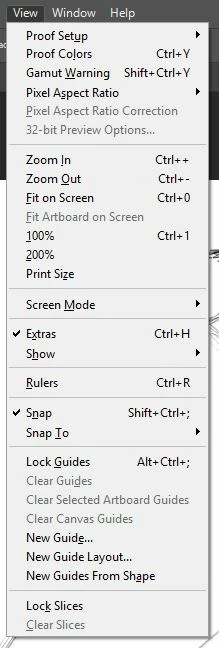
I have the latest update, and nothing I've seen says this feature was removed. Any reason for this to be missing, and how do I bring it back, if possible?

This topic has been closed for replies.

4 replies

gener7
Community Expert
Community Expert
July 1, 2019

It was introduced in CC 2019 9 months ago in response to requests. You may be running an earlier version

Photoshop: Flip Canvas Horizontally "Non Destructively" for duel view editing | Photoshop Family Customer Community

Deke explains it here: https://www.deke.com/content/flip-horizontal-view-in-photoshop-cc-2019

You could use Image Rotation > Flip Canvas in earlier versions. It is non-destructive, but could be slow on large files for preview purposes.

Gene

JJMack
Community Expert
Community Expert
July 1, 2019

Yes its not in CC 2018 for sure.

JJMack
JJMack
Community Expert
Community Expert
July 1, 2019

Have you tried looking under Edit? Why do  you want a view flipped?

However, I do have a View Flip

JJMack
davescm
Community Expert
Community Expert
July 1, 2019

Hi JJ

View > Flip tends to be used when painting as a quick way to check composition . It is quick and effective without actually fliiping every layer with a transform.

Dave

Nancy OShea
Community Expert
Community Expert
June 30, 2019

What file type are you working with?

Nancy O'Shea— Product User & Community Expert
davescm
Community Expert
Community Expert
June 30, 2019

Hi

It is present and correct here in v20.0.5

Can you go to Photoshop >Help >System info and press "copy". Then paste the info here

Dave