
OK, So How Much RAM Does Photoshop CS5 Use?
ANSWER: All you give it, lol!
I posted this for those buying or building a PC and are deciding "how much RAM do I need?"
I built a fairly powerful rig for Photoshop and editing in Premiere Pro, and without all the tech specs, I have 24GB of ram, mostly for encoding HiDef video. Surely Photoshop wouldn't eat THAT much, right? Dead wrong. I have Photoshop set to utilize 75% of my available ram which would be near 19GB. I just worked on a fairly large image, where I took 23 vertical shots with my 5D Mark II (5616x3744 resolution files, pretty big) and did a large photomerge which ended up at about 60,000 x 5,500 after the crop. Granted, large image, nearly 3½GB .PSB file. So while the merging and aligning was taking place, I watched my Ram Gadget soar, right up to 19GB within 4 minutes of processing:
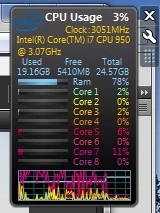
Yowza. I expected that from Media Encoder processing 1080p HD video into a Blu-Ray disc format, but not a Photoshop file. So, the point of all this: ram is lower in cost than it's been in many months, a 12GB Mushkin kit (3x4GB) is down to $169 on Newegg. Don't skimp in that arena, fill 'er up as best as you can. Future versions aren't going to use less ram, let's face it, the software has to process a lot of pixels! Try to go a minimum of 6GB, but definitely 8-12GB if you can. Of course this means bye-bye FINALLY to 32-bit operating systems, but once you have a large playground of memory, you and Photoshop will be happy campers.
 AdChoices