Exit
  • Global community
    • Language:
      • Deutsch
      • English
      • Español
      • Français
      • Português
  • 日本語コミュニティ
  • 한국 커뮤니티
0

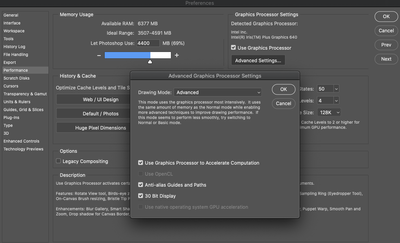
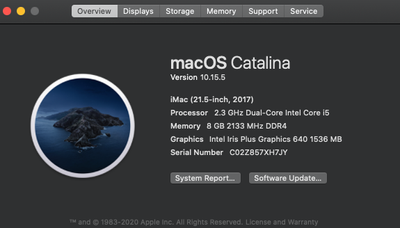
OpenCL Grayed Out with Intel Iris Plus Graphics 640

New Here ,
Jun 26, 2020 Jun 26, 2020

Hello!


I recently bought a mac. Here are screenshots of it's specs and my problem. I thought this GPU would be capatible with photoshop's OpenCL features like Oil Paint, etc...


Screen Shot 2020-06-26 at 11.04.23 AM.png


Screen Shot 2020-06-26 at 11.01.54 AM.png

1.4K
Translate
Report
Community guidelines
Be kind and respectful, give credit to the original source of content, and search for duplicates before posting. Learn more
community guidelines

correct answers 1 Correct answer

Community Expert , Jun 26, 2020 Jun 26, 2020

No, I mean deleting the actual Photoshop Preferences file, which is resaved into your user account every time you quit the application. This makes it susceptible to corruption by cumulative errors. A corrupt prefs file can cause unpredictable and erratic behavior.


If you open Edit > Preferences, there is a button to "reset preferences on quit". This deletes the file so that it is rebuilt on next launch.

Translate
Adobe
Community Expert ,
Jun 26, 2020 Jun 26, 2020

Open CL is a component in the video driver. It could be a bug in the driver (integrated into MacOS), exposed by changed functionality in the new PS version.


But first try to reset preferences. Sometimes a corrupt preferences file can cause problems in a new version with changed code, whereas it didn't give any symptoms in the previous version.

Translate
Report
Community guidelines
Be kind and respectful, give credit to the original source of content, and search for duplicates before posting. Learn more
community guidelines
New Here ,
Jun 26, 2020 Jun 26, 2020

Okay, so I changed the preferences by unboxing all in advanced settings, and then unboxed "use graphics processor". I then closed out PS and reopened. Tried to set back and still grayed out.

Is this process what you meant by resetting preferences?

Translate
Report
Community guidelines
Be kind and respectful, give credit to the original source of content, and search for duplicates before posting. Learn more
community guidelines
Community Expert ,
Jun 26, 2020 Jun 26, 2020

No, I mean deleting the actual Photoshop Preferences file, which is resaved into your user account every time you quit the application. This makes it susceptible to corruption by cumulative errors. A corrupt prefs file can cause unpredictable and erratic behavior.


If you open Edit > Preferences, there is a button to "reset preferences on quit". This deletes the file so that it is rebuilt on next launch.

Translate
Report
Community guidelines
Be kind and respectful, give credit to the original source of content, and search for duplicates before posting. Learn more
community guidelines
New Here ,
Jun 26, 2020 Jun 26, 2020
LATEST

That worked. Thank you so much!! 🙂

Translate
Report
Community guidelines
Be kind and respectful, give credit to the original source of content, and search for duplicates before posting. Learn more
community guidelines