
Participant
September 30, 2018
Answered

OpenCL Grayed Out

  • September 30, 2018
  • 4 replies
  • 20959 views

Hi, I do not know why this is happening but it's frustrating me.

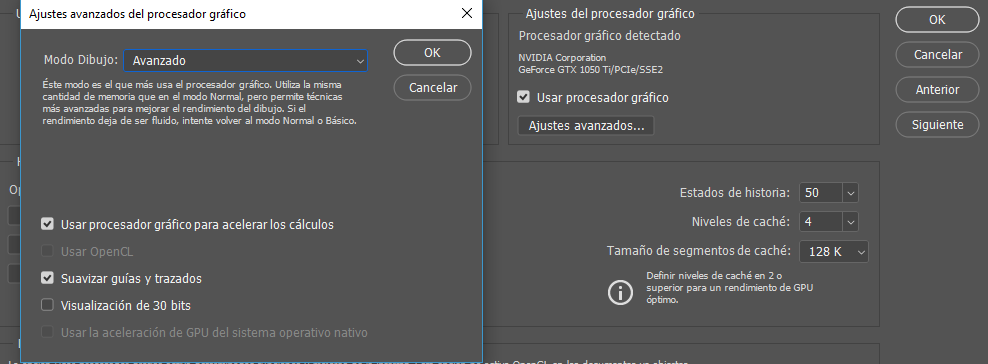
The problem is that the OpenCL box is grayed out. Previously, if the box was ok, but when reinstalling the program, it did not let me check the box.

I have a GTX 1050ti graphics card and it's drivers are updated, so I do not know why the box can not be marked. My photoshop is in Spanish but you can easily deduce what is what, I hope you can help me.

Regards!
This topic has been closed for replies.
Correct answer Muqqarib Hassan

Hi, See this video. It will help you to fix the OpenCL Grayed out.

How to Fix OpenCL grayed out in Photoshop | Enable Oil Paint Filter Option - YouTube

4 replies

Participant
April 20, 2021

Hi,
I kind of have the same problem here but I'm also not able to select the advanced settings
does anybody know what I have to do?
Thanks

Madgizmo
Participant
June 9, 2021

Had the same problem. and was getting really anoyed.

checked youtube and google but still nothing worked.


then i tryed DDU driver uninstaller

https://www.wagnardsoft.com/content/display-driver-uninstaller-ddu-v18039-released


Uninstalled my Nvidia drivers & because i have to GPU's my intel drivers.

Restarted my pc and let Windows reinstall the drivers by itself with Windows update.


After the last install of video drivers from Nvidia i restarted my pc 

and I could use OpenCL again. 


It worked for me and i hope this will work for other people. 


Participant
October 15, 2022

@Madgizmo 

Thank you so much, I have been trying to fix this problem for 2 days it was driving me nuts 

I was getting both the OpenCL Grayed Out error and the Graphics Processor is incompatible error when you open PS along with not being to click in layers pallets 


and with the program and link you posted with directions to Uninstall drivers (I had to both Intel & Nvidia drivers)  Afterwards I restart computer and update the latest Windows updates and restart computer again both errors were corrected, along with being able to click on layers' pallet again in Photoshop 


The tool is very helpful, will keep it in case needed again,   


once again thank you very much 

Participating Frequently
December 10, 2020

Same problem with MacBook (it supports OpenCL, I checked), everything is up to date.

Participant
August 10, 2020

I'm having the same problem on an iMac (2011) 27 with a AMD Radeon HD 6770M 512 MB

Muqqarib Hassan
Muqqarib HassanCorrect answer
Inspiring
September 30, 2018

Hi, See this video. It will help you to fix the OpenCL Grayed out.

How to Fix OpenCL grayed out in Photoshop | Enable Oil Paint Filter Option - YouTube

Trevor.Dennis
Community Expert
Community Expert
September 30, 2018
  • What operating system are you using?  If Windows 10, do you have the 1803 build installed?
  • Check Device Manager to see the date on the Display Adaptor driver, and see if there was an update that correlates to the Opne CL issue?
  • Try uninstalling and reinstalling the GPU driver.
  • Try rolling back the GPU driver.  With my old system I used to install each NVIDIA driver update as they came out, which seemed like once a month or more.  I was constantly running into issues like not being able to set Drawing Mode to Advanced.  At that time, Perspective Warp would only work with Advanced mode set, so it was a pain.  I don't play games, so I now don't update for the sake of it.  What I am saying is that an earlier driver might fix your issue.
  • Try installing CC 2017 or earlier from the Previous Versions list, and see if they allow Open CL.  Not a fix, but more information to work with.