
JimBDuncan
Participating Frequently
November 4, 2018
Answered

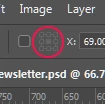
Option Bar element (see image) grayed out. Why?
  • November 4, 2018
  • 1 reply
  • 1499 views

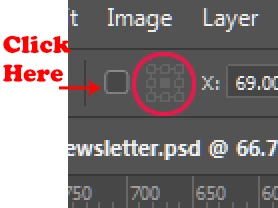
I don't know what it's called, but the 9-box position tool (circled in red) is permanently grayed out. I rely on it, so this is a problem. And it's something I never experienced until the most recent version of Photoshop. How do I use this tool now?
Correct answer Jeff Arola

Click on the small box to the left of the Reference Point Location

New and enhanced features | Latest release of Photoshop CC

1 reply

Jeff Arola
Community Expert
Jeff ArolaCommunity ExpertCorrect answer
Community Expert
November 4, 2018

Click on the small box to the left of the Reference Point Location

New and enhanced features | Latest release of Photoshop CC

JimBDuncan
Participating Frequently
November 4, 2018

I feel stupid, but I'm very grateful. Thank you! And thanks for the link, too. Obviously, I need to read!

https://forums.adobe.com/people/Jeff+Arola  wrote

Click on the small box to the left of the Reference Point Location

New and enhanced features | Latest release of Photoshop CC

k

Known Participant
March 21, 2025

Don't feel stupid. Because then I'll have to too. Same problem. Same solution. What I want to know, now in 2025, is how did that little checkbox get turned off to start with. Was it a new, hardly announced default with my last update? Pshop v 20.2 aka Adobe Photoshop 2025. Or did I simply mis-aim when trying to hit that Reference Point Location box? One false move can cost you a whole lot of time. I've been using Photoshop since it's earliest days and STILL....