CreatorDestroyer
Participating Frequently
September 24, 2020
Question

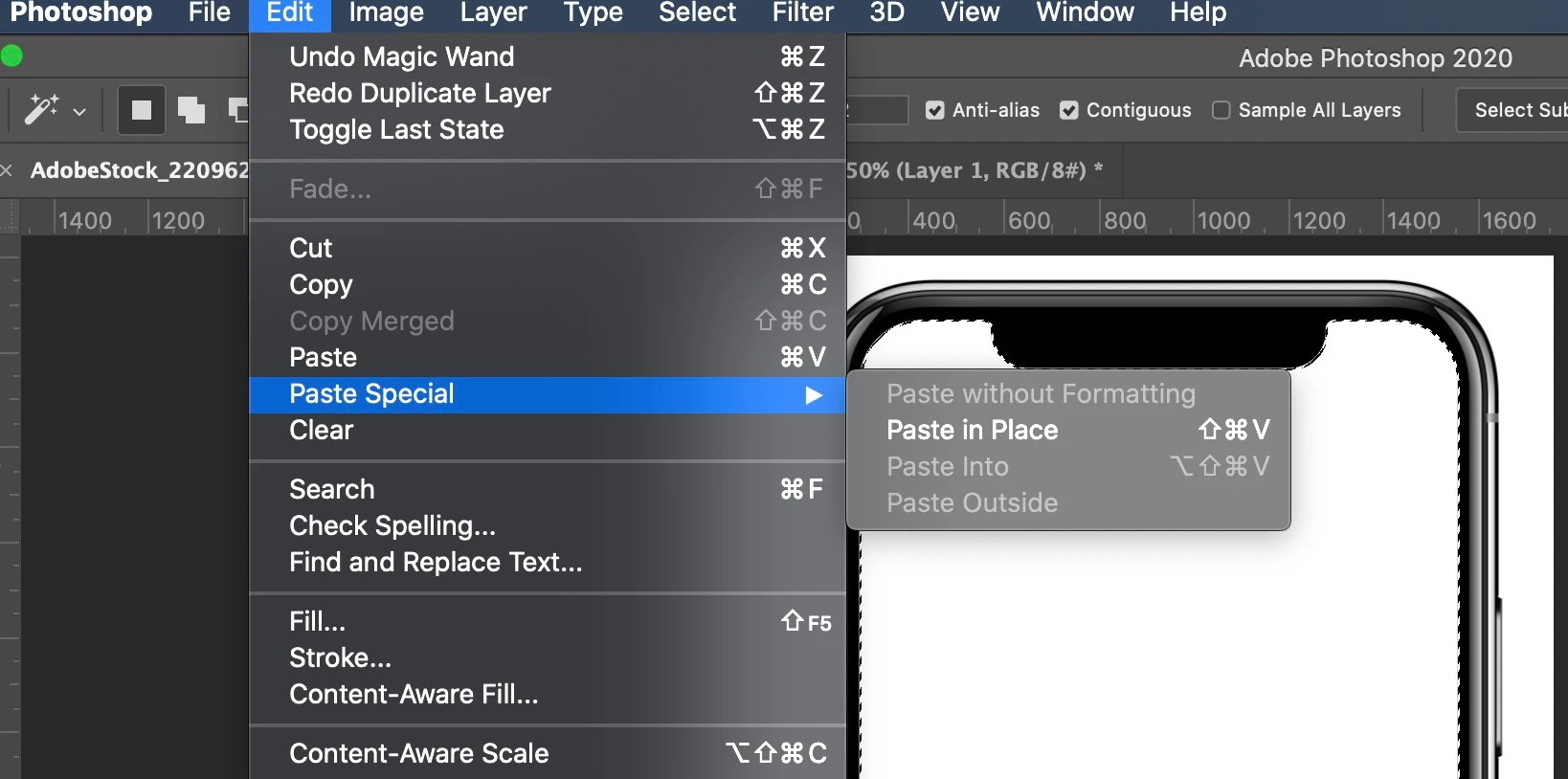
Paste Into greyed out - Paste In Place no longer works

  • September 24, 2020
  • 10 replies
  • 17747 views


Been using Photoshop for more than 20 years now. All of the sudden, these paste options, which I use regularly, no longer appear or do not work as expected. Please help!



This topic has been closed for replies.

10 replies

Participant
February 13, 2024

Solved, go into the layers panel and unlock the layer. All OK after that.

Participating Frequently
February 17, 2023

Just checking -- eveyone here did have the layer they want to paste into selected not just as the active layer, but marching-ants-selected...right? After not using PS for a while, and coming back for a project and trying to Paste Into a layer mask, I couldn't figure out why it wouldn't let me. After some searching around on the Web, I realized I forgotten that it was necessary to use area selection or Select All first on the target layer. (Or maybe that didn't use to be necessary?) Voila, it worked.

Participant
October 18, 2022

Yep also has now happened to me? I feel like photoshop has just got worse and worse over time?


PECourtejoie
Community Expert
Community Expert
October 19, 2022

Do you remember what was the last step before the copy?

There might be a step that triggers a change in behavior.

Quickmask? Object select tool?

RP23
Participating Frequently
November 29, 2021

I had the same problem. I was able to copy and paste a text layer onto another photo using the menu dropdown but when I tried to copy and paste a photo, it was grayed out. At this point whether it is 8 bits or 16 etc doesn't matter because I haven't even told it what photo to paste onto. What finally worked for me was opening the photo I wanted to copy then I hit Select >All to get the marching ants around it and then the "Copy" command was no longer grayed out and I was able to copy and paste the photo finally.

Participant
September 16, 2022

It works for me too. U save my life!

PECourtejoie
Community Expert
Community Expert
September 16, 2022

Hello, @sallytan , could you state if you also cannot Ctrl+C, and tell us if the source image is also in 32 bits, if there is anything special. Can you copy and paste in the same image?

Participating Frequently
February 17, 2021

Hi CreatorDestroyer, thanks for your post.


I found this thread after the exact same issue stopped me in my tracks yesterday. I'm running PS 22.1.1 with CC 5.3.1.470 on a new (2020) iMac running Mac OS 11.1 — Adobe apparently has not addressed what is clearly a bug, not a user error.


I've used the Paste Into feature hundreds of times for years. I always use keyboard shortcuts... it didn't occur to check the toolbar drop down menus until I found your post. Why would it? But sure enough, Paste Into was greyed out under Paste Special, just like your screenshot. In addition, Copy was greyed out in a separate document tab where I had the image I wanted to Paste Into the original file.


I had to completely shut down everything and restart several times before the drop down menus came back fully functional. Keyboard shortcuts still aren't working. No idea why.


If Adobe engineers are interested, I can make a screen movie which duplicates the issue.


Quick backstory (and a little rant):

This should have been a simple two hour job for a new client on a tight deadline. It turned into an all-day nightmare. My blood pressure went through the roof. I missed the deadline and cannot bill the client for hours of my life that melted away forever. The client is unhappy. So am I. I'm wondering why I give Adobe an obscene amount of money for stuff that goes randomly haywire.

Art, like morality, consists of drawing the line somewhere.
CreatorDestroyer
Participating Frequently
February 17, 2021
Now you feel my pain. I don't understand why Adobe changed this feature.
Hope you have some blood pressure medication!

I'm here from scotch.

--
Everything is secret.
Participating Frequently
February 17, 2021

Heh... thanks for the reply. I do indeed feel your pain.

Scotch – good idea. Single or double malt? I'm gonna shut down this junk and take the rest of the day off.

Cheers!


Art, like morality, consists of drawing the line somewhere.
melissapiccone
Community Expert
Community Expert
September 28, 2020

You can right click to copy as well, if that works, might be faster than going to the drop down.

Melissa Piccone | Adobe Trainer | Online Courses Author | Fine Artist
CreatorDestroyer
Participating Frequently
September 24, 2020
Both Windows 10 and Mac - same issue, but after experimenting I can see that it's actually the copy function that seems to be at issue. If I copy using CTRL-C on Windows 10, or Mac's copy shortcut, as I normally do, it does not work. But if I use the toolbar "Copy" it does work. I never use the toolbar copy but use only the shortcuts on keyboards, so, I don't know what's up but I will use the new method from now on. 
c.pfaffenbichler
Community Expert
Community Expert
September 24, 2020

Please post the requested screenshot. 

c.pfaffenbichler
Community Expert
Community Expert
September 24, 2020


Color depth is 32 bit. RGB mode.

Well, every time I use Photoshop (version 21.2.3) now, a debug log appears with nothing in it. 


Does the behaviour also occur if you convert the image to 16bit or 8bit before pasting? 

c.pfaffenbichler
Community Expert
Community Expert
September 24, 2020

Is any Layer selected? 


What have you done for trouble-shooting so far? 

Restoring Preferences after making sure all customized presets like Actions, Patterns, Brushes etc. have been saved might be a good starting point:

https://helpx.adobe.com/photoshop/kb/basic-trouble-shooting-steps.html

melissapiccone
Community Expert
Community Expert
September 24, 2020

Works fine for me. PC or Mac - looks like a mac. Operating system? Photoshop version - I'm using 21.2.3 - just updated the other day. Where are you copying from? Try a different workflow. I never use the drop down menu, I prefer to simply drag and drop from the desktop, my library or Bridge. 

Melissa Piccone | Adobe Trainer | Online Courses Author | Fine Artist
CreatorDestroyer
Participating Frequently
September 24, 2020
Both Windows 10 and Mac - same issue, but after experimenting I can see
that it's actually the copy function that seems to be at issue. If I copy
using CTRL-C as I normally do, it does not work. But if I use the toolbar
"Copy" it actually does work.

Jim

--
Everything is secret.
c.pfaffenbichler
Community Expert
Community Expert
September 24, 2020

Have you tried restoring the Prefernces yet? 

c.pfaffenbichler
Community Expert
Community Expert
September 24, 2020

Could you please post a meaningful screenshot with the pertinent Panels (Toolbar, Layers, Channels, Options Bar, …) visible?