
Participant
March 19, 2018
Answered

Photoshop 11.0 Open Finder Window

  • March 19, 2018
  • 3 replies
  • 2832 views

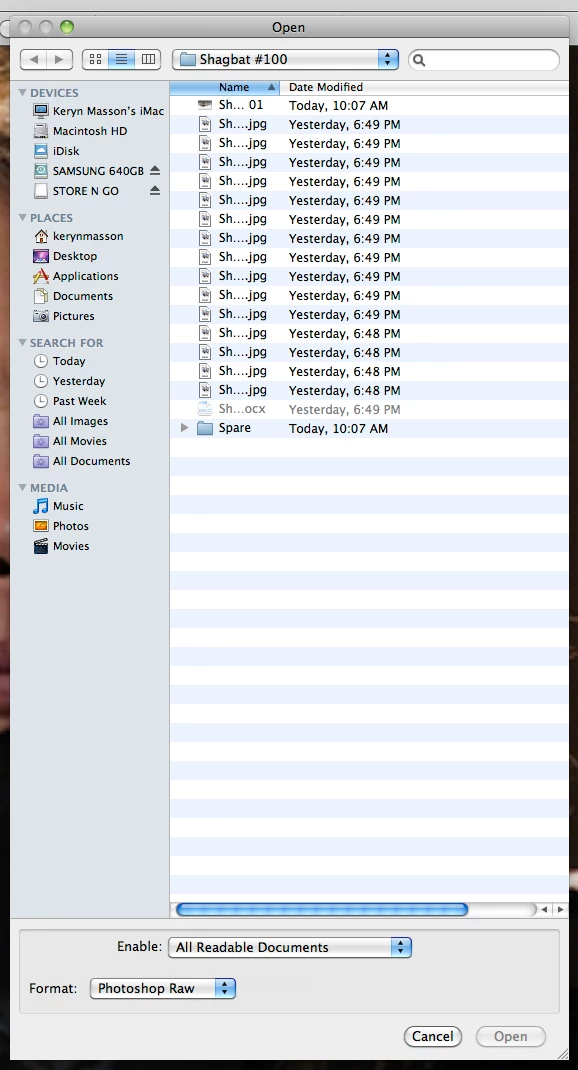
The Photoshop 11.0 Open Finder Window keeps collapsing in the 'Name' field. As I use this a lot it really slows me down. How do I re-set the preferences so this doesn't happen? I also use Illustrator, InDesign and Quark, and it hasn't happened in those.
    This topic has been closed for replies.
    Correct answer Jeff Arola

    It's your User Library

    Try this:

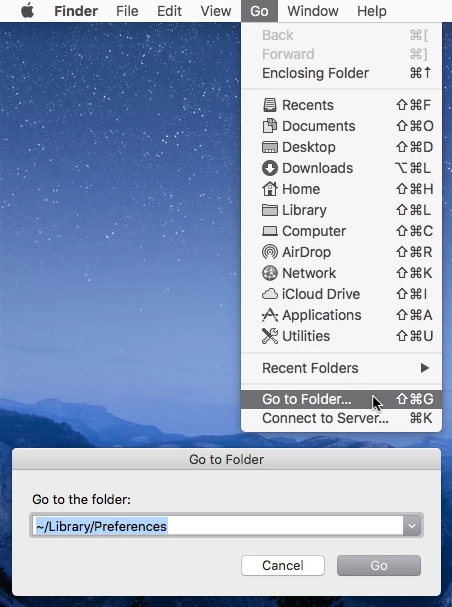
    Click on your desktop and in the Go menu click on Go To Folder

    Then paste or type ~/Library/Preferences

    That should get you Library>Preferences and look for and delete the

    com.adobe.Photoshop.plist

    3 replies

    Jeff Arola
    Community Expert
    Community Expert
    April 28, 2020


    lanaec,


    What version of photoshop are you using?


    Can you post a screenshot?

    Participating Frequently
    April 28, 2020

    I am using an iMac mas 0S  Sierra Version 10.12.6n 10.12.6

    Participating Frequently
    April 28, 2020

    Sorry, I left out the version of photoshop.  It is CS6  purchased over 4 years ago

    Jeff Arola
    Community Expert
    Community Expert
    March 20, 2018

    What version of mac os x are you using?

    See if going to

    /Users/User Name/Library/Preferences

    and trashing the

    com.adobe.Photoshop.plist

    fixes the issue.

    Participant
    March 21, 2018

    Thanks for the reply Jeff.

    I’m using Mac OS X 10.6.8

    I tried to find /Users/User Name/Library/Preferences with no luck.

    Does it apply to me (I’m using CS4)?

    Jeff Arola
    Community Expert
    Jeff ArolaCommunity ExpertCorrect answer
    Community Expert
    March 21, 2018

    It's your User Library

    Try this:

    Click on your desktop and in the Go menu click on Go To Folder

    Then paste or type ~/Library/Preferences

    That should get you Library>Preferences and look for and delete the

    com.adobe.Photoshop.plist

    Trevor.Dennis
    Community Expert
    Community Expert
    March 19, 2018

    Hi Keryn

    I'm a Windows user so can't offer much insight into what I suspect is related to your version of OSX.  It might be helpful to know what that version is?  Can you also describe in a bit more detail what is happening?  I am guessing that is the way the name field is truncating the file name so you can't read the whole name. Is that right?

    How do those fields look in the other applications you mention?  Are the other fields in the same order and the same size as in Photoshop?

    Have you expanded the window to show more of the fields?

    With Windows, double clicking the interface between fields auto expands them to the required width.  Have you tried that?

    Participant
    March 21, 2018

    Thanks for getting back to me Akash. Sorry I’ve taken so long to reply (work getting in the way).

    I’m currently using a Mac OS X 10.6.8.

    You seem to have grasped the problem. And it only happens in Photoshop (Illustrator, InDesign etc are fine).

    If you drag the window across you can see the name in full, and if you double click the interface it expands sufficiently. The problem is it doesn’t stay open. Every time you use it you have to drag or double click it open, which really slows down my work (I publish magazines and work with a lot of photos).

    This problem only started about a month ago. The window has stay open since I first installed CS4 many years ago. And it hasn’t affected the other CS4 programmes.

    I re-installed Photoshop but that made no difference.

    I’ve tried sourcing the internet, but a major hiccup is how do you word your request?

    If you call it a window you usually get tips on Widows.

    Or your request relates the word windows to actual photos.

    I’m guessing it’s something to do with preferences or settings, but when you type these nothing is relevant to this problem.