
Photoshop 2017 freezing frequently (30s-1min)
Hi all,
Windows 10 64-bit
16GB Ram, i7, Quadro M1200
SSD M2 with read/write rates around 1gb/s
I keep having the issue that Photoshop 2017.1 starts fast but then hangs for 30 seconds straight. I'm not opening a document.
The document that I open afterwards causes similar issues to occur, even though the document is just a few MB big.
Documents are all stored on my local drive. There are a few network drives installed on my system, but they do are not output paths / file paths.
I've analysed the process and the following occurs:
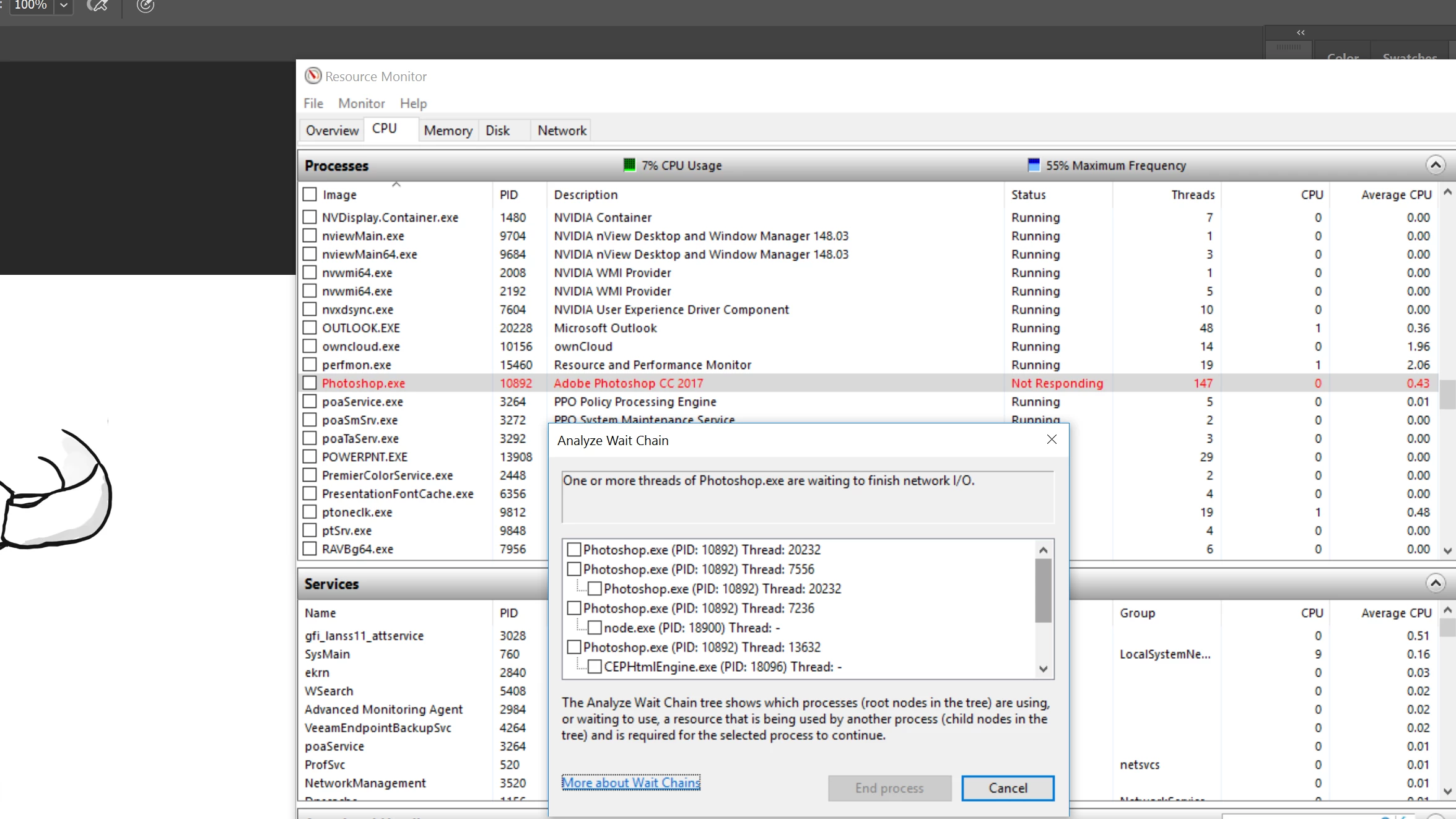
It's clearly reporting Not responding but only little CPU use.
The wait chain reports it's 'waiting for Network I/O'.
What exactly is it doing and what can I try to further analyze the root-cause of the issue?
I know you guys may consider this insufficient information to address the issue. But any word on how to further analyze the issue?
EDIT: New insights
- Issue does not occur when I disable all my network adapters.
- Issue does not occur with Illustrator or After Effects, which I also use frequently.
- Issue always seems to take the exact same time (I could hold a stopwatch and measure the same time every time it freezes)
 AdChoices