

Terri Stevens
Legend
November 2, 2016
Question

Photoshop 2017 is here

  • November 2, 2016
  • 3 replies
  • 2885 views

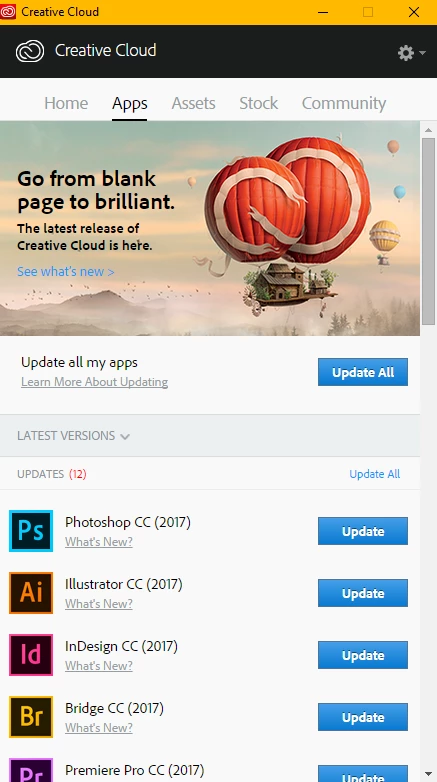
PS2017 has just been released along with updates to all the Creative Cloud apps. The new version removes Photoshop CC 2015.5.1. by default. Many forum users have expressed a wish to keep the previous versions in the past and you can if you do the installation properly

1) Click on 'update' next to Photoshop CC(2017)
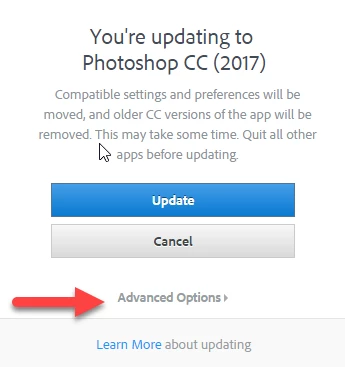
2)  Click on 'advanced options'
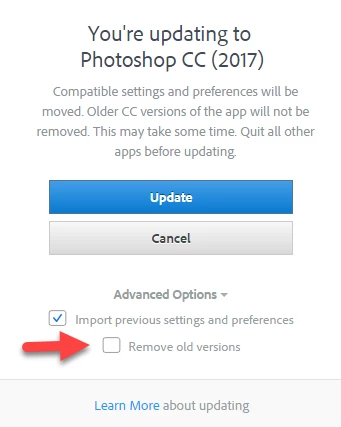
3) Make sure the 'Remove old version ' checkbox is not checked.
    This topic has been closed for replies.

    3 replies

    Participant
    November 3, 2016

    Well, it's not a good update on macOS for my workflow:

    - it's slower than the previous version.

    - it froze the Mac at least once.

    - the stupid problem with the "Save as Optimized" dialog of the Export > Save for Web… action is still completely buggy: the menu shortcuts are acting on the Safe for Web "dialog" instead of the "Save as Optimized" dialog.

    Mac Pro Late 2013 / OS X 10.11.6

    SeaArt
    Participant
    November 2, 2016

    So far it keeps crashing when I open it. Uninstalled and reinstalled. Turned computer off/on. Updated driver. No love. Help?

    Nancy OShea
    Community Expert
    Community Expert
    November 2, 2016

    I'm using the new CC 2017  right now on Windows 10 with a 2TB hard drive and 64 GB of Ram. So far no problems.

    Tell us more about your system and what you're doing just before it crashes or stops responding.

    Nancy O.

    Nancy O'Shea— Product User & Community Expert
    SeaArt
    Participant
    November 2, 2016

    I'm running Windows 10, 16GB Ram, 500GM harddrive, 8GB Graphics Drive.

    Just got this computer today at work, so it doesn't have much installed yet and haven't used it more than two hours. Was getting it set up with my software. Installed Adobe CC app, then proceeded to install all the adobe suite programs. Clicked to open Photoshop. It crashes after going through the opening screen. Doesn't offer a crash report. Specifically says "Adobe Photoshop CC 2017 has stopped working" and the only option is to "Close Program". Like mentioned above: rebooted, uninstalled/reinstalled PS, updated video drivers. These didn't help. Going to uninstall the entire suite and start over unless you have another suggestion.

    Thanks,

    Ryan

    Nancy OShea
    Community Expert
    Community Expert
    November 2, 2016

    What's your opinion of PS CC 2017 so far?

    Nancy O.

    Nancy O'Shea— Product User & Community Expert
    Terri Stevens
    Legend
    November 2, 2016

    Hi Nancy,

    I'm travelling home on the train at the moment so haven't had time to really try it. I thought it important though to tell everyone how to use the advanced install as so many people get caught out with the old version being uninstalled. Have you had the opportunity to do anything with it?

    Terri

    Nancy OShea
    Community Expert
    Community Expert
    November 2, 2016

    Not yet, Terri.  I'm doing a system wide scan and washing away some pre-release betas before I install any new products.   I should be ready to take the plunge in a few hours. 

    N

    Nancy O'Shea— Product User & Community Expert