100pk
Inspiring
October 16, 2018
Answered

Photoshop 2019 disable start screen gone from preferences

  • October 16, 2018
  • 10 replies
  • 39135 views

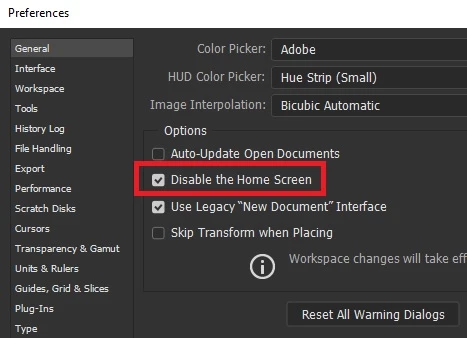
It seems the function to disable the start screen has been removed from prefs > general.

Very annoying it keep popping up every time I close document after working with it.

This topic has been closed for replies.
Correct answer

Hi

It's called "Disable the Home Screen" now
10 replies

Participant
September 2, 2020

The answer to how to get rid of the home page in PhotoShop (at least for the current version) is ridiculously simple - maybe even useful.

If you have Photoshop opened to the Home Page you'll see under the three color dots in the upper left corner the letters "Ps" in blue. Click on the Ps and voila you will see in front of you a standard PhotoShop work page and the Home Page will be gone! To get back to Home Page, should you really want to use it, you will now see under the color dots a little picture of a house. Click on the house and the Home Page willl come back and the work canvas will be gone. Forget the Prefrences.

That's it. When the Adobe person showed me all that I asked why Adobe has'nt put this info out on the web he said that they were working on it.

Good Luck

assafbezalel
Participating Frequently
January 19, 2020

This is not at all solved or the correct answer.

This option is ompletly removed from the prefernces i latest photshop.

it is now called "Auto show the home screen" and even if this option is not ticked the home screen still show when no files are open. Home screen is slow to load and makes photoshop slower.


Not only that, but sometimes I have sensetive files in the recent files list

and I have no eway of turning that off. only way is to clear recent files list every once in a while

but you know what? Sometimes i forget and my coleeags might see some photos I don't want anyone to see.
So why noy just giving us the simple feature of turning the home screen completly off?


Waiting for a real answer and not this answewr whhich dost not solve nothing.

Thank you

Participant
January 28, 2020

OK, guys, I've accidentally came accross a fix for this annoying thing, yay!

Open Photoshop

See annoying Home screen

Press ESC on the keyboard

Behold, the Home screen disappears, party time!

If you want to make this permanent, go to Preferences and uncheck: Auto show the home screen

Close and reopen Photoshop and forget the nightmare

Enjoy and hope Adobe doesn't try to destroy other things that we like : DDD

GeorgeRompolis
Participant
May 28, 2020

That's it!!! Thanxxxx so much!!!!

Erik Lingerfelt
Known Participant
October 25, 2019

This is by far the correct answer. It's the logical, but not the solution.
I'm a mix of IT Adobe/Mac Expert and I've made several tests. The ONE thing that is keeping my open files from disappearing from screen, property panels not showing and, after all is closed, have this annoying Home Screen pop-up is to KEEP it popped-up.
Untick the "Disable Home Screen" and untick the WINDOW / APPLICATION FRAME option.
Of course, you'll have that nagging Home Screen somewhere, but just keep it aside and forget about it. I hate it, but that's better than having problems with the image windows etc. Now I don't have to restart PS after the bug kicks in.

Martingc
Participant
November 24, 2018

Nothing from above works for me, think have to return to 2018
hate this version. by the way Indesign consuming a lot of ram and slooooowww my work, I change to 2018 too

Participant
November 5, 2018

Thanks for the quick easy answer, I missed that as well. Thanks to Adobe for continuing to make little annoyances such as this.

Participating Frequently
October 30, 2018

I believe I have found how to disable Photoshop CC 2019's automatically appearing home page. I managed to remove it (so far so good) by using this combination of settings:

1. First tick the selection box (in Preferences/General) that says "Disable the Home Screen" (as has been suggested already).
2. Then, in the application itself, select Photoshop's top menu item called "Window" and in the drop down menu, 3rd from the bottom, remove the tick next to "Application Frame".
3. Finally close and restart Photoshop.

it's worked for me so far... but gremlins being what they are... as in Murphy's Law... I'll hold my breath a little before being certain. Feedback please if it doesn't work.

Participating Frequently
October 30, 2018

Participant
February 14, 2020

Wow thanks this has worked for me!

mariah72795456
Participant
October 28, 2018
Participating Frequently
October 29, 2018

NB Mac Users:  Mariah's "easy instructions" above, are for Windows machines.

Participant
October 23, 2018

I have the same problem since upgrading and already spoke three times to Adobe support. They've tried to fix it remotely but it still pops up. It's very annoying. I'm running it on Mojave. Definitely a bug.... and I really hope that Adobe solves the issue soon.

tedda69445871
Participating Frequently
October 21, 2018

This is not the answer for Elements 19. The disable the start screen has been removed from prefs > general. How can you get rid of this major irritant?

October 21, 2018

That's because this is a Photoshop forum, you need to post your query here Photoshop Elements

tedda69445871
Participating Frequently
October 21, 2018

Thank you. Will do. I never know where I am half the time wading through the menus.

Tedd Adams

Correct answer
October 16, 2018

Hi

It's called "Disable the Home Screen" now

100pk
100pkAuthor
Inspiring
October 17, 2018

I must have been looking sideways; tx!