
Inspiring
May 9, 2017
Answered

Photoshop Actions - Colors?

  • May 9, 2017
  • 2 replies
  • 5788 views

So I noticed that the Photoshop Actions creation panel allows me to assign a color to the action. However, when I have added a color to it, the color doesn't show up anywhere in the actions panel. I made it orange. Nothing is orange...

I thought this would be like the coloring for the layers, where I could add a color to the actions and help visually distinguish them - especially since there is no way to create subfolders for action sets... I have a series of around 22 fairly complicated actions and I would like to distinguish first-tier actions from second tier actions and third-tier actions.

So what are the colors for???
    This topic has been closed for replies.
    Correct answer Bojan Živković11378569

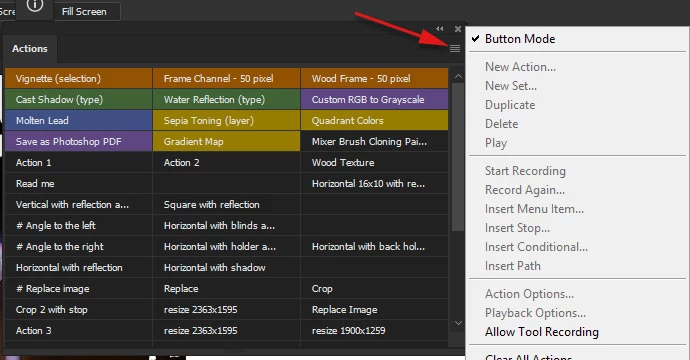
    Colors are visible in Button mode. Click on Actions panel menu and choose: Button Mode.

    2 replies

    eschelarAuthor
    Inspiring
    May 9, 2017

    lol, i've never used the button mode before. Looks dangerous. Clicking on anything accidentally runs an action. I can't think of any reason to ever use button mode - not as a guy who makes actions, nor as a guy who makes actions for other people to use. I would never want to use that mode for myself and I would never recommend it for someone who doesn't know how to use actions well.

    I don't understand why the colors are turned off in regular mode though. Seems like someone had to actually make extra effort to make the code work in a less useful way. What a strange thing to do.

    Bojan Živković11378569
    Community Expert
    Community Expert
    May 9, 2017

    Colors are visible in Button mode. Click on Actions panel menu and choose: Button Mode.