This topic has been closed for replies.

3 replies

davescm
Community Expert
Community Expert
May 25, 2021

Can you recheck your document size. You would not be the first to have created a 1920 x 1080 pixel document that turned out on rechecking to be 1920 x 1080 inches


Dave

TheDigitalDog
Inspiring
May 25, 2021

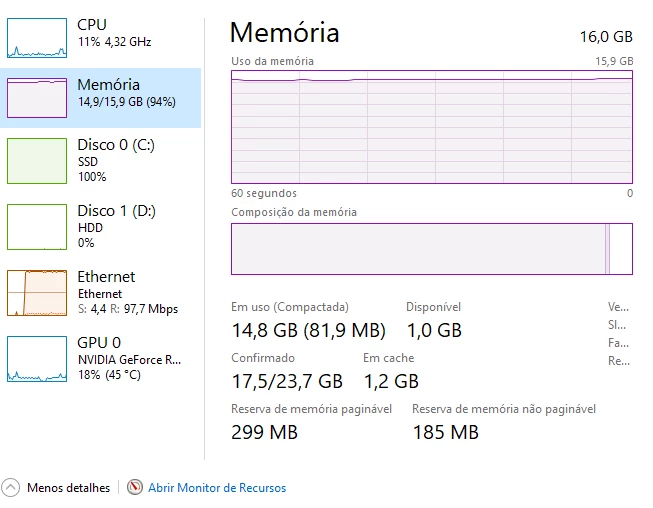
Photoshop needs 3 to 5 times the size of each open document in RAM. So depending on the size (and layers, bit depth play a role) is large enough, this isn't necessarily unusual. 

Author “Color Management for Photographers" & "Photoshop CC Color Management/pluralsight"
Nancy OShea
Community Expert
Community Expert
May 24, 2021

What is the height, width and resolution of your image?  Large images consume more resources than small ones.


Restart your computer to reset scratch disk and RAM.


Ensure your computer is robust enough to handle the workload.  

- https://helpx.adobe.com/creative-cloud/system-requirements.html

Pay particular attention to Photoshop's new GPU requirements. See links below.
- https://helpx.adobe.com/photoshop/system-requirements.html
- https://helpx.adobe.com/photoshop/kb/photoshop-cc-gpu-card-faq.html


Nancy O'Shea— Product User & Community Expert
Participant
May 24, 2021

i was crerate one file1080x1920px 72dpi
I have 16GB of RAM, Razer 5 3.5Mhz GTX 2060
i already restart my computer, but not work

Nancy OShea
Community Expert
Community Expert
May 25, 2021

How many GB are available to your Scratch Disk -- Edit > Preferences > Scratch Disk?


Nancy O'Shea— Product User & Community Expert