
Participating Frequently
August 3, 2019
Question

Photoshop brush problem on win 10 1903

  • August 3, 2019
  • 4 replies
  • 1418 views

[oh, my god, finally I find this link to post a question].

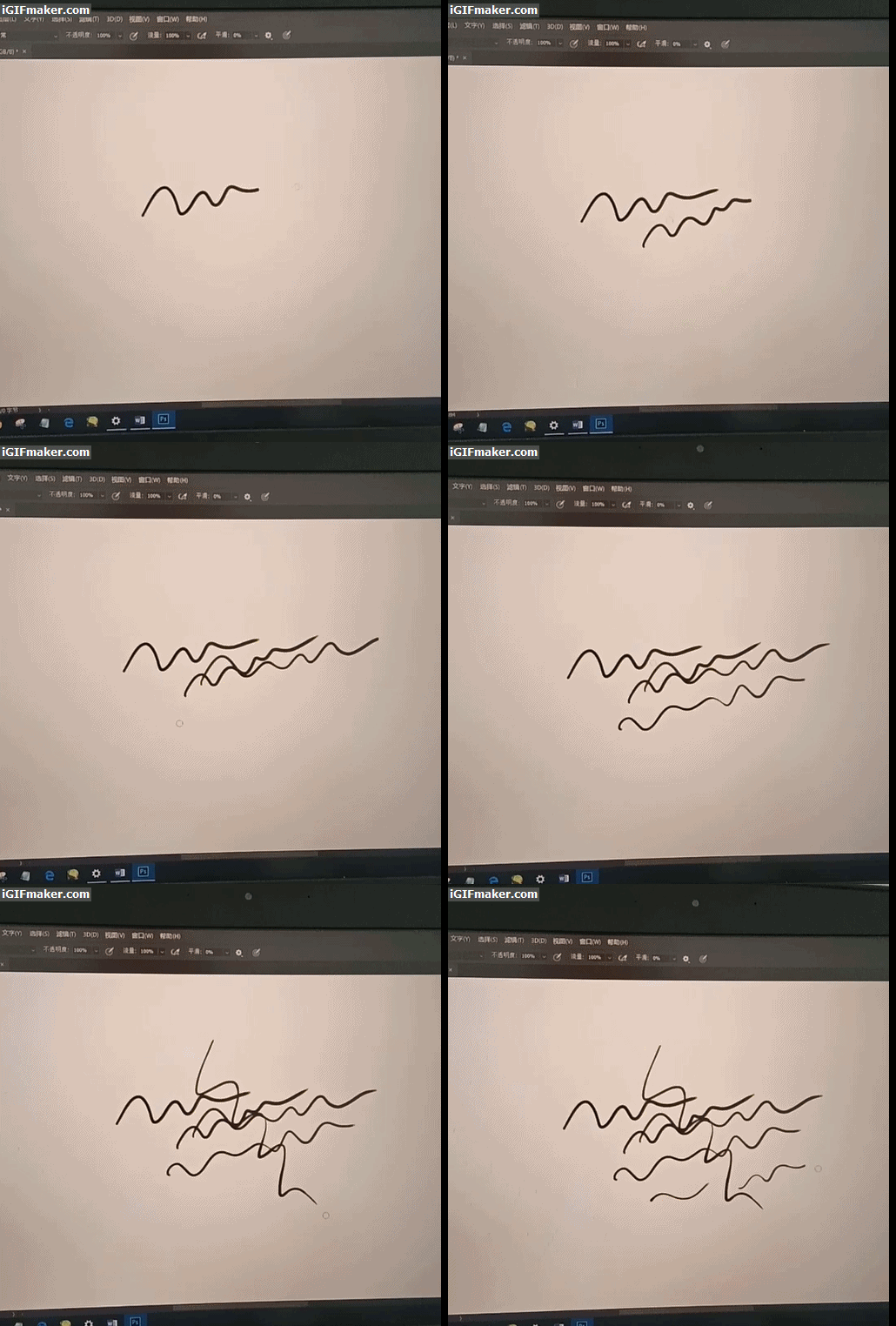
This problem doesn't appear in earlier win 10, but 1903. Just like this GIF shows, when I draw a line, the tail of the line shrinks firstly, and when I draw the second line or just click the mouse, the tail appears. So, how to fix this. CS6 and CC2018 have the same problem.
This topic has been closed for replies.

4 replies

JJMack
Community Expert
Community Expert
August 7, 2019

In your gif it look like Photoshop Brush smoothing may be involved even though your Adobe brush smoothing set to 0% and may be related to you Nvidia GPU support. Could you try something for me and set Adobe Photoshop brush smoothing to 20% and check the last three options in Smoothing settings. Then try brushing.

JJMack
Participating Frequently
August 7, 2019

There is nothing changed, the problem is still there.

And there is another strange problem, when I select or deselect one of the checkboxes, the first line drawed by the brush won't resonse to pen pressure.   

Participant
August 6, 2019

I have the problem too,thanks for your accurate description,Win10 1903,Ps cc2019,Nvidia 1060 laptop,I tried,I don't know how to do,T_T

Participating Frequently
August 6, 2019

The only thing you can do now is going back to win 10 1809 or older version,  I am using Paint Tool SAI now.

Participant
August 7, 2019

I found when I forbidden the Intel graphic card in Device Manager,then open PS and it can't even read the Nvidia card,that's sad.

jane-e
Community Expert
Community Expert
August 4, 2019

Several people have reported this issue. One person found a solution in this thread:

Brush tool stroke disappears and reappears Photoshop CC 2019 (Windows 10)

Participating Frequently
August 4, 2019

But I don't really want to try this, I've deleted the Windows_old folder several days ago. Thank you all the same.

italosan
Community Expert
Community Expert
August 3, 2019

Hi, have you already tried to reset Adobe Photoshop preferences?

Participating Frequently
August 3, 2019

It doesn't work, it still has the same problem. In fact, I didn't change Preference by myself before.

JJMack
Community Expert
Community Expert
August 3, 2019

That should not happen if you use a mouse it may happen when you use a Pen.  When I use my mouse on window 10 build 1903 and Photoshop CC 2019 version 20.0.5 no change in brush dynamics.  When I use my mouse the Brush dynamics does not change.  When I use my Wacom pen the brush dynamics may change.

JJMack