
MrLarryHW
Participant
September 4, 2017
Question

Photoshop Brush Sizes Not Working Properly

  • September 4, 2017
  • 2 replies
  • 8547 views

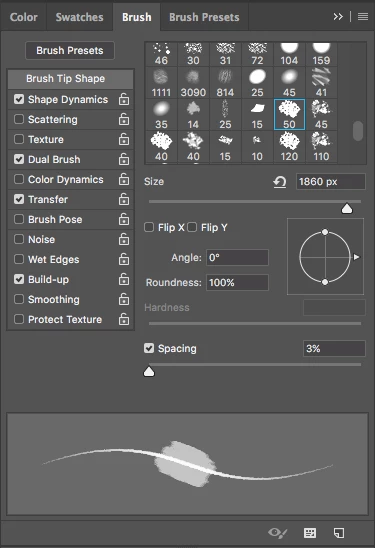
I am having this problem where I size up my brush, but about halfway through the brush size preview starts to get smaller again, except this middle part which stays about the same size and is faded in the background. The actual brush itself gets smaller too, I cannot get it to be bigger than 150px or so. I would like it so I can make my brush size bigger to the fill 3,000 px size. I've attached a screenshot which shows this too. I don't think this is normal and I know it sounds weird, but if any of you know a fix to the problem, I would appreciate that very much. I have a 2012 Mac Mini running MacOS Sierra with Photoshop CC 2017. Let me know if you still need any clarifications.
This topic has been closed for replies.

2 replies

Participant
November 18, 2019
 

I had the same problem.


You have to do this.


Participant
November 18, 2019


Check the red area.

gener7
Community Expert
Community Expert
September 4, 2017

You do have "Dual Brush" checked for some reason and it isn't the default.

Reset your Brush Tool and see if that helps. Ctrl or right click on the Brush Tool icon in the Option Bar and choose "Reset Tool."

MrLarryHW
MrLarryHWAuthor
Participant
September 4, 2017

Okay, thanks. That's strange, I do not ever remember checking that. Could it be the default on a specific brush?

MrLarryHW
MrLarryHWAuthor
Participant
September 5, 2017

Yes, you can simply uncheck it. You may notice that your brush selections dim out, so be sure to click on "Brush Tip Shape" to deselect

Dual Brush options.


Okay, it still doesn't seem to be working as I would like, but at this point I think it is the way the brush is supposed to be. All of the brushes are working perfectly fine except one bundle that I purchased. When I click on Reset Tool, it gets me out of dual brush mode and selects another brush, but when I go back to that brush that wasn't working properly, it goes back to dual brush mode right away.