

wakenthedead
Known Participant
May 15, 2018
Question

Photoshop calling in virtual keyboard in Windows 10

  • May 15, 2018
  • 3 replies
  • 4300 views

Hi. Every now and then Photoshop will call this weird virtual keyboard, and sometimes I can't even close it until I restart my computer. It's becoming annoying.

Anyone know which settings I need to go to or any way to disable this feature that I don't need? Screenshot attached.
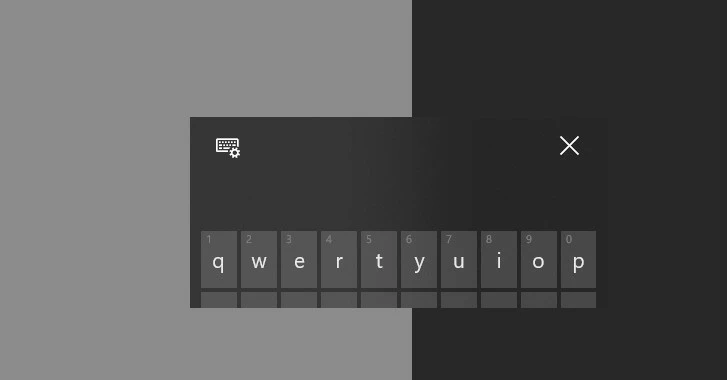
    This topic has been closed for replies.

    3 replies

    wakenthedead
    Known Participant
    June 4, 2018

    Thanks for trying to help.

    I haven't been able to reproduce the virtual keyboard that won't close. So it fixed itself. May have been windows updates or drivers, or maybe photoshop update that came in from the cloud. I waited for 3 weeks before posting, I think it's safe to say it's gone.

    Now there's only one virtual keyboard left, it's more of an annoyance and distraction, it pops everytime I rename a layer or folder and will close as soon as I use the keyboard to start typing/renaming. I've read somewhere it's a feature and it can't be disabled? I rather label it as a bug than feature tbh.

    As per info requested:

    Adobe Photoshop Version: 19.1.4 20180507.r.325 2018/05/07: 1170750  x64

    Operating System: Windows 10 64-bit

    Version: 10 or greater 10.0.17134.1

    PECourtejoie
    Community Expert
    Community Expert
    May 15, 2018

    Hello, please provide both the complete exact version of Windows 10 you are using, the version of Photoshop (help>System info will tell you that) and which steps exactly create that issue.

    May 15, 2018

    Hi

    Windows Key + CTRL + O will open and close it

    wakenthedead
    Known Participant
    May 15, 2018

    Thanks for your suggestion, however, it did not kill the keyboard pop up, it just opened a bigger one along.

    As shown in screenshot attached

    May 15, 2018

    Strange, the large keyboard you see is the Windows onscreen keyboard, the smaller one doesn't look right, what options do you see when you click on the cog icon