Exit
  • Global community
    • Language:
      • Deutsch
      • English
      • Español
      • Français
      • Português
  • 日本語コミュニティ
  • 한국 커뮤니티
0

Photoshop CC 2017: where is the line spacing gone?

Community Beginner ,
Jun 26, 2017 Jun 26, 2017

Hi,

i'm using PS CC 2017.1.1 and the character / paragraph menu has been "simplified" and I just cannot find the line spacing anymore.

This is what my new character panel looks like:

http://prntscr.com/fobvjj

I am looking for the line spacing. Previously it was there (with option like Auto, or 10pt, etc...)

All I want is to set the line spacing between paragraphs.

Thanks!

2.1K
Translate
Report
Community guidelines
Be kind and respectful, give credit to the original source of content, and search for duplicates before posting. Learn more
community guidelines

correct answers 1 Correct answer

Community Expert , Jun 26, 2017 Jun 26, 2017

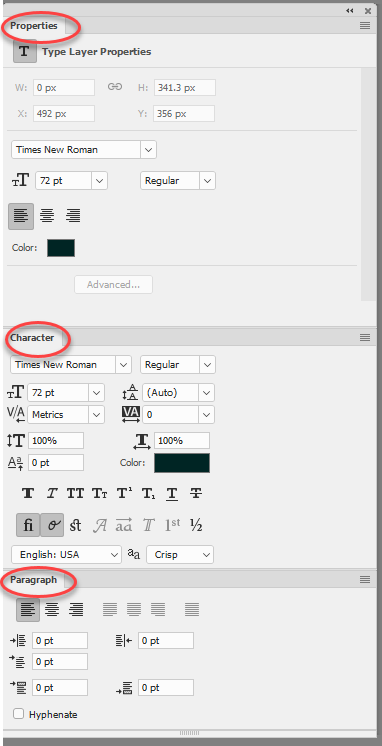
Your screenshot is the text layer properties panel.

What you need is the Character Panel (Window>Character ) and Paragraph Panel (Window>Paragraph)

Dave


Translate
Adobe
Community Expert ,
Jun 26, 2017 Jun 26, 2017

That's the Properties panel. Try Window > Character or Window > Paragraph.

Translate
Report
Community guidelines
Be kind and respectful, give credit to the original source of content, and search for duplicates before posting. Learn more
community guidelines
Community Expert ,
Jun 26, 2017 Jun 26, 2017

Your screenshot is the text layer properties panel.

What you need is the Character Panel (Window>Character ) and Paragraph Panel (Window>Paragraph)

Dave


Translate
Report
Community guidelines
Be kind and respectful, give credit to the original source of content, and search for duplicates before posting. Learn more
community guidelines
Advocate ,
Jun 26, 2017 Jun 26, 2017

You are looking at the Properties panel and not the the Character panel. You can go to  Window>Character to bring up the Character panel or click on the Advanced button in the Properties panel. (Avancé)

Translate
Report
Community guidelines
Be kind and respectful, give credit to the original source of content, and search for duplicates before posting. Learn more
community guidelines
Community Beginner ,
Jun 26, 2017 Jun 26, 2017

Hi,

When I do Windows / Characters I reach the Property Tab I pasted the screenshot above.

When I do Advanced on that tab nothing happens.

I have a "Character style" tab but it looks like this:

http://prntscr.com/focqsx

I also have a PAragraph style that looks like this:

http://prntscr.com/focr8j

Hidden in there I have a paragraph spacing but I cannot see the screenshot Dave displayed above.

When I do Windows / Paragraph I reach my "paragraph style".

I have been using line spacing for  almost 20 years in Photoshop and suddenly I'm really confused. Old age?

Translate
Report
Community guidelines
Be kind and respectful, give credit to the original source of content, and search for duplicates before posting. Learn more
community guidelines
Community Beginner ,
Jun 26, 2017 Jun 26, 2017

EUREKA!

I found the orginal panels: they were simply displayed BELOW a long list of panels, completely off screen!

Duh.... Really old age.

Depressed...

Thanks for all!

Translate
Report
Community guidelines
Be kind and respectful, give credit to the original source of content, and search for duplicates before posting. Learn more
community guidelines
Community Expert ,
Jun 26, 2017 Jun 26, 2017
LATEST

Don't worry, we've all been there ☺

Dave

Translate
Report
Community guidelines
Be kind and respectful, give credit to the original source of content, and search for duplicates before posting. Learn more
community guidelines