
elianab54985748
Participant
November 5, 2017
Answered

Photoshop CC 2018 Pen pressure issues

  • November 5, 2017
  • 4 replies
  • 7320 views

My System Info:
Adobe Photoshop Version: 19.0 20170929.r.165 2017/09/29: 1138933  x64

Operating System: Windows 10 64-bit

Version: 10 or greater 10.0.15063.296

System architecture: AMD CPU Family:15, Model:2, Stepping:0 with MMX, SSE Integer, SSE FP, SSE2, SSE3, SSE4.1, SSE4.2, AVX

Physical processor count: 4

Logical processor count: 8

Processor speed: 4000 MHz

Built-in memory: 16332 MB

Free memory: 2 MB

Memory available to Photoshop: 14444 MB

Memory used by Photoshop: 60 %

Display: 1

Display Bounds: top=0, left=0, bottom=1080, right=1920

Display: 2

Display Bounds: top=0, left=-1440, bottom=900, right=0

glgpu[0].GLName="AMD Radeon (TM) R9 390 Series"

Current tablet: Wacom Intous Pro

The issue that photoshop is showing to me is that when I am drawing and I want to switch to other window, when I go back to Photoshop to keep drawing the pen pressure doesn't work until I wait 20sec or so, THIS HAPPENS EVERYTIME I switch tabs and it's annoying because I can't see general images references to draw from google images or pinterest.


This didn't happen in the previous photoshop version... I started to have this issue with the lastest update. How can I solve this or do I have to wait for an update?.
This topic has been closed for replies.
Correct answer JJMack

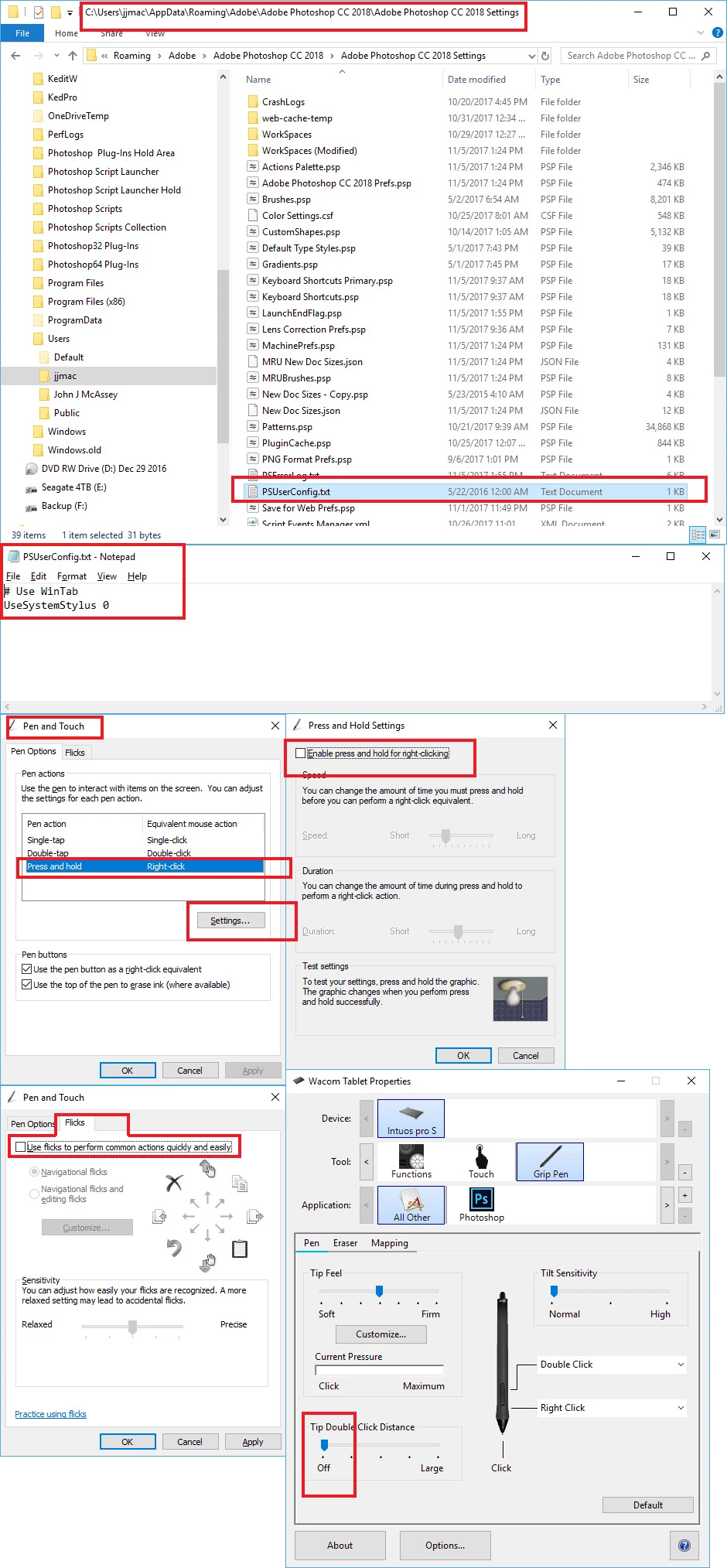
Did you add the required config file to you CC 2018 preferences so the Photoshop would use Wintap api? I also diasnle some ot Windows 10 pen and touch support on windows 10. Also pen double tap distance off.

4 replies

CrystelVB
Participant
September 13, 2018

Thanks, this saved me a lot of time!

Participant
March 29, 2018

**Side note for those who are using this fix on Win10: Be sure you don't type in the .txt, but leave the name as "PSUserConfig" ONLY, otherwise the file itself will end up being "PSUserConfig.txt.txt" and Photoshop won't recognize it. Took me an hour to realize this. Hope it helps!

JJMack
Community Expert
Community Expert
March 29, 2018

You need to set your Windows explored view setting to show  extensions of known file types  so you will not rename files *.txt to *.txt.txt

JJMack
JJMack
Community Expert
Community Expert
November 6, 2017

I notice you have a newer Wacom device driver then the one I have installed.  You may want to try the one I have installed

6.3.23-1 you have you have 6.3.25-5 installed.

I see this but have not installed 6.3.25-5 for I seem to be workink OK.

JJMack
JJMack
Community Expert
Community Expert
November 5, 2017

What device driver version etc all you show is a partial system info. You are using Windows 10 and CC 2018 wacom Intuos pro. How do you have your Intuso pro configured. I have mine using wintab API and can not say I see any problem with pen pressure. Switchint between application is not problem the othe application though will be using Microsoft INK Api I only configure my tablet to use wintab API for Photoshop only.

JJMack
elianab54985748
Participant
November 5, 2017

I tried already switching from wintab to windows ink and vice versa. The same issue keeps happening, the only thing that happened is that when I disabled windows ink, the pen pressure stop working even after I restarted photoshop.

https://gyazo.com/5181a186134430f57d154e71cabbb1d2

JJMack
Community Expert
JJMackCommunity ExpertCorrect answer
Community Expert
November 5, 2017

Did you add the required config file to you CC 2018 preferences so the Photoshop would use Wintap api? I also diasnle some ot Windows 10 pen and touch support on windows 10. Also pen double tap distance off.

JJMack