Answered
Photoshop CC 2018- Where are the spot healing and healing brushes?
Has anyone noticed that the spot healing and healing brushes in the tools when Photoshop CC 2018 updated? I can't find it anywhere on this program.

Has anyone noticed that the spot healing and healing brushes in the tools when Photoshop CC 2018 updated? I can't find it anywhere on this program.
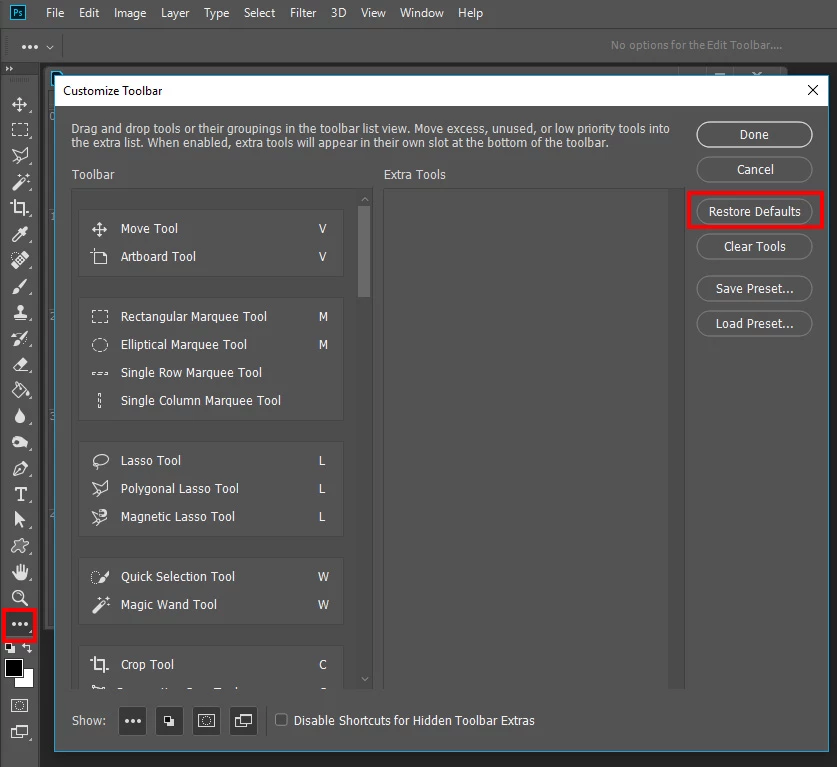
Did you customize tool bar. Right Click on the three dots in the tool bar and edit and reset the toolbar back to its defaults
Already have an account? Login
Enter your E-mail address. We'll send you an e-mail with instructions to reset your password.
 AdChoices