Participating Frequently
March 19, 2018
Question

Photoshop CC freezes when trying to change font

  • March 19, 2018
  • 5 replies
  • 8999 views

I have a

Last night when I was working in PS CC my computer froze after I added type and tried to change the font (this was the first type added to this file). I took it as a sign to stop working for the evening. This morning when I launched PS CC I got this warning.
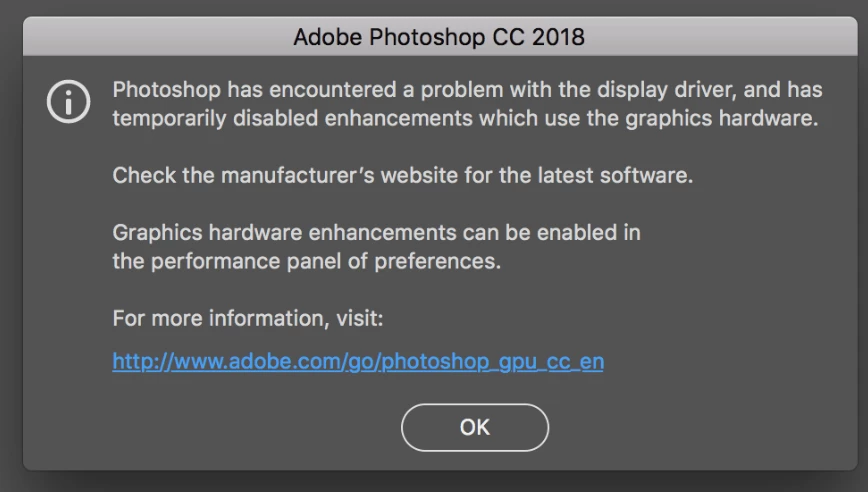
PS CC managed to launch and so I went on to working, until I ran into the font issue again. I could create type and type it out but when I went to change the font PS CC responded with the spinning beach ball. I have had to force quit every time.

HERE ARE THE THINGS I'VE DONE SO FAR:

-Ran a validation in Font Book and removed anything that had an ! by it, then emptied the trash.

-Went into (preferences - performance) and unchecked the use graphic processor. Which I think was turned off in the first place but cannot remember anymore. Is this better to be checked or unchecked? I would think checked but at this point I have no confidence in what I think is best for PS. I should mention that the error has happened only twice, once after the very first time I launched it this morning, and then one other random time in the probably 15 times I've launched PS today. Since this has only happened twice can I speculate that it is a fluke? Should this lead me to think that my graphics card is NOT bad?

-I also went in and clicked the "reset preferences upon quit"

I am still experiencing the font/freezing problem.

HERE IS WHAT I'D LIKE TO KNOW:

Do I have a font problem or is it something else?

Is my graphics card bad?

This topic has been closed for replies.

5 replies

Participant
August 11, 2020

Hello, everyone. Cutting to the chase I recently started running into a similar problem with CC18. This is what I discovered. The temporarily freezing issue only happened when selecting/previewing a font type on a text that had been resized using the FREE TRANSFORM method (in Windows Ctrl T and drag in either direction to stretch / shrink / make the text bigger or smaller), instead of the traditional way of setting a font size number. 


At this point I had 2 different ways to go: inserting a new text and avoiding the "free transform" method or... if the problematic text is already there, using the "Reset Character" option which you can find in the Character menu (right top corner) and then adjust the size through size number. And that's it, NO MORE FREEZING  DURING FONT TYPE PREVIEW.


I had done some research online and tried different recommended solutions, like the ones related to graphic card, but the problem was still there (which was a relief considering I own a decent and expensive graphic card).


As an additional and IMPORTANT note,I have noticed other font related problems when using the FREE TRANSFORM method, like spacing not working properly. So I would recommend avoiding this method until your text/paragraph is fully redacted and you don't need to make other font modifications. 


Windows 10 64bit (running on a Samsung 500 GB SSD)

Intel Core i7-3960X @3.30GHz / RAM: 64GB

GForce GTX 1070


Participating Frequently
June 28, 2018

Ok I'm back with a new computer and the same problem. This time I don't get an error, photoshop just freezes up when I go to use the character box. It worked for a little while on my new laptop but is happening again within the last week. I use photoshop for my work so I have to get this figured out.

Trevor.Dennis
Community Expert
Community Expert
March 20, 2018

Hi

There is a font troubleshooting FAQ for Photoshop

Troubleshoot fonts issues in Adobe Photoshop CC, 2015, 2014, CS6, CS5

Simmer1
Community Expert
Community Expert
March 20, 2018

Hey,

Many thanks!

From: Trevor.Dennis <forums_noreply@adobe.com>

To: Simeon Elson <simeonelson@yahoo.co.uk>

Sent: Tuesday, 20 March 2018, 20:32

Subject: Photoshop CC freezes when trying to change font

Photoshop CC freezes when trying to change font

created by Trevor.Dennis in Photoshop - View the full discussionHi There is a font troubleshooting FAQ for Photoshop Troubleshoot fonts issues in Adobe Photoshop CC, 2015, 2014, CS6, CS5 If the reply above answers your question, please take a moment to mark this answer as correct by visiting: https://forums.adobe.com/message/10256843#10256843 and clicking ‘Correct’ below the answer Replies to this message go to everyone subscribed to this thread, not directly to the person who posted the message. To post a reply, either reply to this email or visit the message page: Please note that the Adobe Forums do not accept email attachments. If you want to embed an image in your message please visit the thread in the forum and click the camera icon: https://forums.adobe.com/message/10256843#10256843 To unsubscribe from this thread, please visit the message page at , click "Following" at the top right, & "Stop Following" Start a new discussion in Photoshop by email or at Adobe Community For more information about maintaining your forum email notifications please go to https://forums.adobe.com/thread/1516624. This email was sent by Adobe Community because you are a registered user.

You may unsubscribe instantly from Adobe Community, or adjust email frequency in your email preferences

Simmer1
Community Expert
Community Expert
March 20, 2018

Hey,

I don't think using Photoshop for an animation is the problem.

I have only had problems with fonts in Photoshop in the past as well, not the other CC programs.

If your font problem persists give tech support a call, so you can get on with being creative.

Thanks,

Sim

Participating Frequently
March 20, 2018

Thanks for pointing me in the right direction.

Arrin

Participating Frequently
March 20, 2018

Ended up contacting Adobe. Spent most of the day with them to find out that it is my graphics card that is bad. I'm posting this for anyone who has the same problem down the road. Reboot in safe mode was the final clue.

Simmer1
Community Expert
Community Expert
March 19, 2018

Hey,

I have had a similar problem in the past with certain fonts I have installed.

How I tackled the problem was to delete the font entirely including the zip file, then restart the computer.

Sometimes it is best to keep your problem solving process as simple as possible.

When we start checking boxes to the point which we cannot remember if they were checked or not it can make matters worse, but hopefully not in your case.

I don't think you have a bad graphic card from the issue you described I would think it was the font you had installed.

I hope this helps.

Sim

Participating Frequently
March 20, 2018

Thanks Sim, I do delete the zip files from downloads after installing them but perhaps there is another place that I am unaware of. I will search my HD for those.

As for your comment "When we start checking boxes to the point which we cannot remember if they were checked or not it can make matters worse, but hopefully not in your case." This is good advice, and it makes me laugh at myself for doing that...hopefully it will be ok.

I'll put the graphics card thought off to the side and tackle that troublesome font(s).

Participating Frequently
March 20, 2018

Maybe it's worth mentioning that I'm not having any of these issues in Illustrator or Indesign. Also, I wouldn't think this would matter but I bring it up because of the timing, I recently used Photoshop for an animation project. I don't usually use PS for animation, could I have inadvertently hit something in PS?