
Ana Elisa Ro Gu
Participant
March 22, 2020
Answered

Photoshop changes color

  • March 22, 2020
  • 5 replies
  • 6614 views

Hello! i recently got a new computer and installed Photoshop... I don't know why every time i open an image it changes the colors! A window pops up and says that there is a lack of profile, i've tried changing multiple things in that window, but nothing seems to work... I tought it was a problem with the images i was uploading, but i created a new proyect, painted some random circles and then saved it as an image, and still when i import that new image (created in ps and uploaded into a same color profile) all the colors still seem wrong! i am desperate, i've lost a day of work trying to fix it /:
I've never had any problems like these before! and i have used ps for several years now!

Has anyone had a similar problem? or does someone know how to fix it? i'll attach the circle images i created so you can see what i mean!
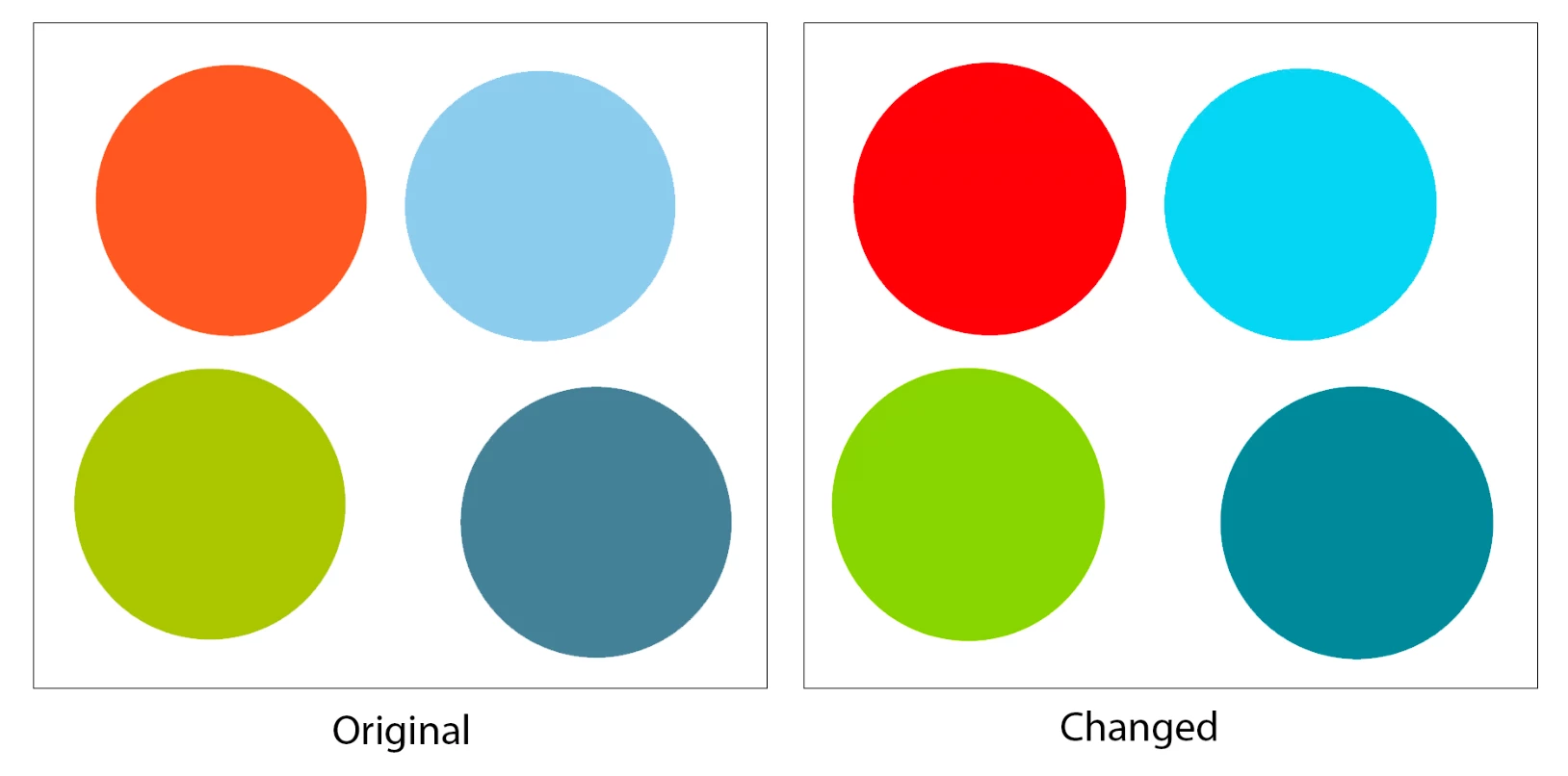
I know it's subtle, but i do need the accuracy for what i do 😞

Thank you so much for your time!


Ana

This topic has been closed for replies.
Correct answer D Fosse

Post the exact error message, word for word.


This is either a missing/corrupt/incorrect document profile, or a malfunctioning/defective/incorrect monitor profile. You need both these profiles in correct working order. One is embedded in the document, the other is set up at system level.


Don't change anything in Photoshop's color settings. If you have, change it back.

5 replies

NB, colourmanagement
Community Expert
Community Expert
April 30, 2020

Gabriel

Just so you know, if you have an Adobe RGB file (as you seem to from your screenshot) it should be "converted" to sRGB for web browsers and instagram

i.e. image/mode/convert to profile [sRGB]

this coverts the pixel numbers to suit the sRGB colourspace so retains the wanted appearance


If sRGB is 'assigned' that’s not the right method because "assigining" is just changing the profile label 'tag' to sRGB rather than converting the image colour information from Adobe RGB to sRGB.

When you assign the appearance will change.


I hope this helps


neil barstow, colourmanagement.net :: adobe forum volunteer

[please do not use the reply button on a message in the thread, only use the one at the top of the page, to maintain chronological order]

Ana Elisa Ro Gu
Participant
April 4, 2020

Thank you all so much! i figured it out based on what you told me 🙂 Sorry to reply so late, i had a rough situation (everything's fine now)  Thank you again! (:

Participating Frequently
April 27, 2020

hi ana, can you help me figure it out too? I'm having the same problem. The colors in Ps are not the same in my iphone and, when I post something on an IG account, changes even more! I'm really desperate. Plus, the problem also happens backwards (collors more alive in instagram account than in Ps). So, I'm seeing 3 colors: one in photoshop, other on my iphone and another on IG...

c.pfaffenbichler
Community Expert
Community Expert
April 27, 2020

Do you have an idea of Color Management? 

Because to me it sounds like you are trying to match the colors displayed on a non-Color Managed device and whatever »IG account« is supposed to mean to a Color Managed application, namely Photoshop. 


Please set the Status Bar to »Document Profile« and post neaningful screenshots. 


c.pfaffenbichler
Community Expert
Community Expert
March 22, 2020

Please set the Status Bar to »Document Profile« and post meaningful screenshots of the originally created image and the re-opened image. 

Community Expert
March 22, 2020

Hi, if you're working on a new installation of photoshop in a new machine, please check and syncronize the color profile management setings between the old computer and the new one, and check the document profile embedded in the images.

Please take a look here:

https://helpx.adobe.com/photoshop/using/understanding-color-management.html

D Fosse
Community Expert
Community Expert
March 22, 2020

Synchronizing color settings is not necessary. If unsure, Photoshop's color settings should be left at default settings. Above all, color management policies should always be set to "preserve embedded profiles". Then everything will be handled correctly by Photoshop.


If something's still wrong, it's usually the profiles. You can't experiment with profiles. A profile is a map, it has to correspond to the landscape.


The document needs to have an embedded color profile, and it needs to be the correct one. If the profile is missing, anything can happen.


The monitor profile needs to be an accurate description of the monitor's actual and current response. A calibrator will do that. If you don't have a calibrator, you're likely to receive generic monitor profiles from the monitor/laptop manufacturer, distributed through Windows Update or included in "install" files. These profiles are very often defective.

D Fosse
Community Expert
D FosseCommunity ExpertCorrect answer
Community Expert
March 22, 2020

Post the exact error message, word for word.


This is either a missing/corrupt/incorrect document profile, or a malfunctioning/defective/incorrect monitor profile. You need both these profiles in correct working order. One is embedded in the document, the other is set up at system level.


Don't change anything in Photoshop's color settings. If you have, change it back.