
Participating Frequently
May 20, 2017
Answered

Photoshop CS Actions not working in CC

  • May 20, 2017
  • 2 replies
  • 4231 views

I have created actions to resize, and round corners, bevel edges ext.  I have moved them to the new CC platform but they images will not save, or I get an error about make not available. 

File: "C:\Users\Chris\Pictures\new\Huangdi_TYE.jpg"

Error: Could not save as "C:\Users\Chris\Pictures\...\" because the file could not be found. (-43)

File: "C:\Users\Chris\Pictures\new\LifeOfRiches.jpg"

Error: The command "Make" is not currently available. (-25920)

This error is from opening an image, seting sice to 100X100 and 72 dpi.  then ctrl + s to save.

I recreated this action in CC and it appears to work but I have many actions saved that do quite a bit more work that are not easy to re-create.

I run these actions as batch, select the source folder and a destination folder.  hopefully i wont need to revert back to cs5 to continue working with these.

Thanks

Chris
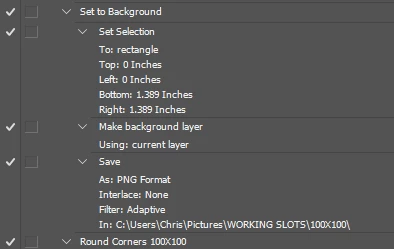
looking though the actions, I see there are paths set, and this is odd as before i could use and source  / destination folder.  Can this be altered?
    This topic has been closed for replies.
    Correct answer JJMack

    I posted my Creating Action package in this thread.  I do not write well but the package has many tip and guide lines for creating well crafted actions.   Including how to target layers relatively.  Also included in the package are a dozen utility script I wrote to be used in actions so actions can do things not possible without a little logic.

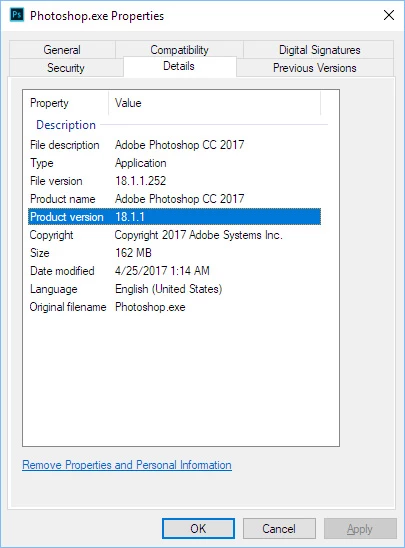
    It take knowledge and practice to create action that work well on just about any document.  I tried to package what I learned over the years in a few nutshell.  You do not have to read my gibberish most likely it full of bad grammar an typos.  However I do know Photoshop quit well.  I used it from Photoshop version 3.  CC 2017.1.1 is Photoshop version 18.1.1 and I do know how how to target layers without naming it.  And what Photoshop command change the current target when used.


    I added the Close No Save and saved the action set here is a link to it.  It should save png file on your desktop.  Action recorded using CC 2017.1.1 testset.atn

    Note You will need to use the action Palettes fly-out menu item Record Again  on the save step to change the path from my desktop to Your Desktop...... There need to be an open document when you do that.

    2 replies

    JJMack
    Community Expert
    Community Expert
    May 20, 2017

    Crafting Actions Package UPDATED Aug 10, 2014 Added Conditional Action steps to Action Palette Tips.
    Contains

    Example
    Download

    JJMack
    Participating Frequently
    May 21, 2017

    I save as PNG for the transparent effect and use on the web.  I select a background layer as a template to create a rounded edge and save.  This works well on my old system.  All images that use this action are 100X100 before it is run.

    Participating Frequently
    May 21, 2017

    Also, all images are set to 72 dpi, 100X100 and saved as a png before this action is used.  The old action of doing these steps no longer works but I created a new one in CC and there is no issue, the more complicated actions I really do not want to re-create.

    JJMack
    Community Expert
    Community Expert
    May 20, 2017

    I can see the action  may have problems if your not careful.  If the Document has a Background layer (Like a Jpeg) The Make Background layer Using current layer would fail.  It would also fail if an adjustment layer was the current targeted layer.  The selection step may fail if the document resolution set to high a the are not a sufficient amount pf pixels for 1.4" x 1.4:".  You doing  a save PNG just after making a Background Layer so there will be not Transparency.  What you reason for saving in PG .  The is nothing wrong recording a destination folder in a save as step.  You can batch the action and override the Save as step settings using the Batch processor dialog. So you can change the destination when you batch the action.  It there was no destination recorded in the action where would Photoshop  save a new document?

    JJMack