
Squigiman
Participant
February 16, 2019
Answered

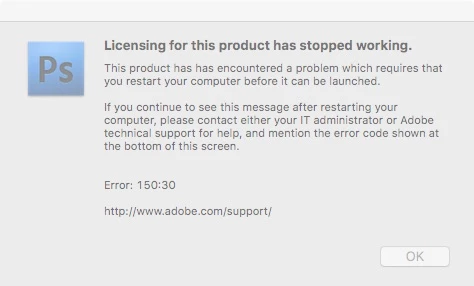
Photoshop CS4 Licensing Stopped Working - Error 150:30

  • February 16, 2019
  • 2 replies
  • 1105 views

Hello,

   I was wondering if anyone could help me with something.  All of a sudden, my copy of Photoshop CS4 stopped working.  I am getting an error saying licensing for the product has stopped working.  It suggests restarting my computer, which I have done twice, to no avail.  I checked, and it looks like all of my CS4 programs are affected.  I know this is an older version, but everything does what I need, and I can't afford to be told to just upgrade to the latest version as a solution, right now.  Any help in resolving this would be very appreciated.  Thanks, in advance!

   -Zach
This topic has been closed for replies.
Correct answer gener7

I have a screenshot guide set up for repairing this error if you are using a Mac. It gets to the point and shows how to use the License repair Python script. Study and carefully follow those steps.

150:30 screenshot guide

https://forums.adobe.com/thread/1714695   Posts 11-18

2 replies

gener7
Community Expert
gener7Community ExpertCorrect answer
Community Expert
February 16, 2019

I have a screenshot guide set up for repairing this error if you are using a Mac. It gets to the point and shows how to use the License repair Python script. Study and carefully follow those steps.

150:30 screenshot guide

https://forums.adobe.com/thread/1714695   Posts 11-18

Squigiman
SquigimanAuthor
Participant
February 16, 2019

Hi, everyone!  Thanks for the above advice.  I am at the step where Terminal should be running the License Recovery, but it said it may take a few moments and then showed a question mark.  It's just sitting at that, with a gray cursor box next to it.  No indication as to whether it has finished or anything.  Any ideas?

   -Zach

Squigiman
SquigimanAuthor
Participant
February 16, 2019

Never mind.  I realized it had text above it, and it was waiting for another press of Enter/Return.  Looks like it worked.  Thanks, again, everyone!

   -Zach

February 16, 2019