
Participant
November 7, 2017
Question

Photoshop CS4 Version 11.0

  • November 7, 2017
  • 2 replies
  • 1813 views

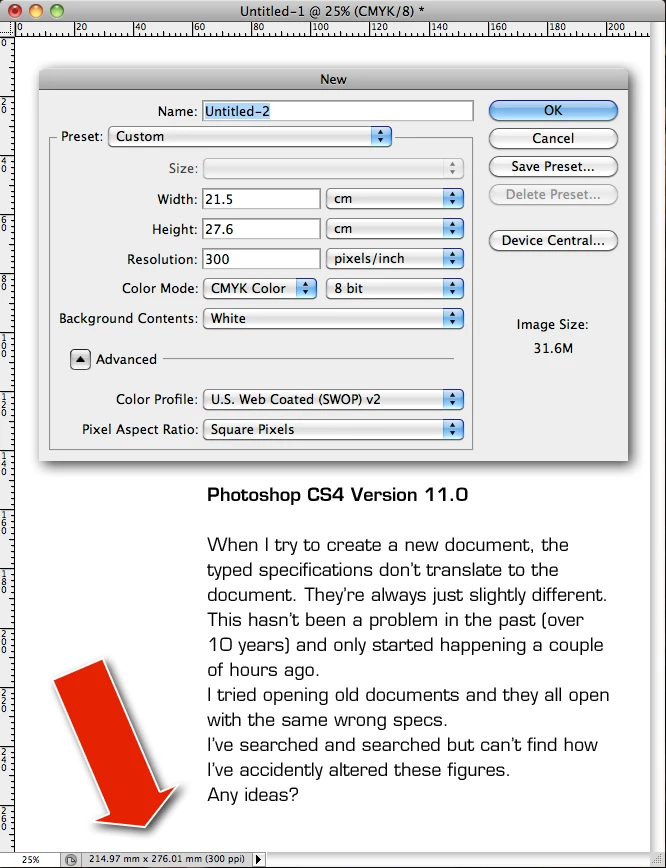
When creating a document the typed specs don't translate to the new document. They're slightly different.

This problem only began a few hours ago and has been fine for over 10 years.

I tried opening old documents and their specs have changed too.

I must have touched something I shouldn't. Any ideas?

Keryn
    This topic has been closed for replies.

    2 replies

    mglush
    Community Expert
    Community Expert
    November 7, 2017

    What do you type in, and what does it change to? I noticed your working in cm but your Resolution is pixels/inch. Is that how you normally work?

    Michelle

    gener7
    Community Expert
    Community Expert
    November 7, 2017

    If you right-click within the rulers and choose Centimeters the numbers will match.

    But here is where Photoshop is getting those numbers:  2539 divided by 118.11px/cm which is 300 ppi. is 214.97 mm rounded out.

    gener7
    Community Expert
    Community Expert
    November 7, 2017

    Pixels are whole numbers, so 118.11 should be 118. Plug that in and your millimeters should more closely match.

    gener7
    Community Expert
    Community Expert
    November 7, 2017

    What Photoshop is doing is rounding out cm and being more precise at mm. You're good even if you are .03 mm off.

    And I'm getting the exact same results in Photoshop CC 2018 using 300 ppi using your dimensions.

    By the way update CS4 to Adobe - Photoshop : For Macintosh : Adobe Photoshop CS4 11.0.2 update - multiple languages