
Photoshop CS5 Pen tool Selection problem?
I've been using photoshop for a while, and have never encountered this problem. I've had CS5 for about a year now and this is the first time it has done this, so hopefully someone can help me!
When I open photoshop, everything works. I make a new layer, go to use the pen tool, make my shape and then complete it, and the line solidifies showing its a complete shape. I right click, and select the option: Make Selection.
Instead of turning the inside of the shape into the selected part, it selects everything outside of it!
I can't for the life of me figure out how this started happening, as it didn't do it a few days ago. I must have hit a button or something, but its still very annoying. Hopefully someone can help! Restarting both the program and the computer, does not help.
 It's been a while... Ah, here: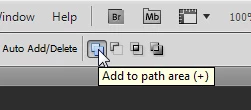
 AdChoices