Participant
September 22, 2017
Answered

Photoshop CS6 Download issue - please help

  • September 22, 2017
  • 2 replies
  • 2041 views

Hi

I have an issue with downloading Photoshop CS6 on my Windows 10 64 Bit computer.

I tried through Adobe website with after disable firewall and auto protect in my Norton internet Security with allow popup and cookies. Used Google Chrome but I tried Internet Explorer also. Even though download completed, it can’t run it on the computer and it doesn’t appear auto run box on my computer. Also I can’t see it in the program files & so I guess it hasn’t been downloaded yet. My computer & it’s hardware is ok with the requirement’s & it can’t figure out what would be the problem. Not sure if anything I could need to adjust more on my computer & in window10. Also wondering has Photoshop CS6 downloads restricted now and so. Also has it to login adobe account before start downloads.

If anyone can write me few lines & give some helpful points would be appreciated.

Cheers.

mohan.
    This topic has been closed for replies.
    Correct answer gener7

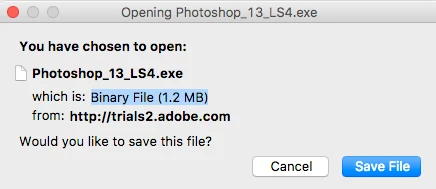
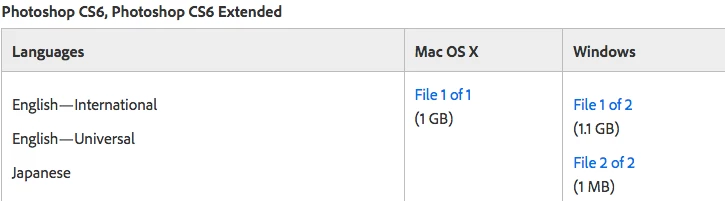
    Click on "File 2 of 2" Check your Browser preferences as to where downloads go to. Mine is set to Desktop

    2 replies

    gener7
    Community Expert
    Community Expert
    September 22, 2017

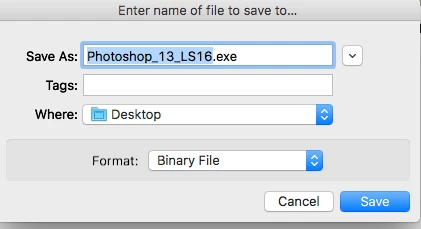
    If I recall correctly, you have to download two files. Do not select the "Open with..." option. Use the Save to option which will place the two files in your Downloads folder.

    One file is an .exe  Double-click on that and it will unpack the .7z file to create a folder with the Installer and its components inside.

    Double-click the Installer and you are good to go.

    Don't forget to run Help > Updates once you open Photoshop.

    Gene

    Participant
    September 25, 2017

    Hi gener7

    I got 7z file (as Photoshop_13_LS16) in my downloads but can’t find the exe. file with it in my windows 10 system to unpack 7z file. If you have time please give me a point how to do it.

    Thnx

    gener7
    Community Expert
    gener7Community ExpertCorrect answer
    Community Expert
    September 25, 2017

    Click on "File 2 of 2" Check your Browser preferences as to where downloads go to. Mine is set to Desktop

    JJMack
    Community Expert
    Community Expert
    September 22, 2017

    Download Adobe Creative Suite 6 applications

    CS6 downloads as two file on Windows  the exe file will upacks the large file and you run setup found ine the extracted folder to install CS6.  If you have 7Zip installed on your system you can just download the large windows  file and uppack it using 7Zip.

    You will need you old serial number for cs6 to activate it also you need to update CS6 to version 13.0.1.3 anrd install ACR 9.1.1

    Adobe - Photoshop : For Windows

    JJMack
    Participant
    September 25, 2017

    Hi JJMack

    I got 7z file (as Photoshop_13_LS16) in my downloads but can’t find the exe. file on my windows 10 system. So would you be able to help me with it

    Thank you