

Photoshop CS6 - Pen Pressure Not Working With HP x360
Hello all,
I have an HP Pavilion x360 convertable laptop, which I got to be able to draw directly on the screen with an HP Active Stylus (stylus has battery). I ran photoshop on this computer for two years and had no problems with pen pressure like I had had before when I used my Wacom Bamboo tablet. I recently got my computers battery replaced, and as a result I had to uninstall and reinstall photoshop on the computer, and now my pen pressure problems are back.
I have checked every single post about fixing pen pressure, I have tried every single troubleshoot that applied to my situation, and still, the pen pressure settings on photoshop will not work. I've recalibrated my pen, which I don't think is the problem because pen pressure is working on other applications, and still, nothing. I made sure that the "Always use pen pressure for size" icon is clicked at the top of the screen. I have found nothing helpful so far for trying to fix this problem, and I'm at my wit's end because I had no previous problems with pen pressure and this computer. I feel like it definitely has to do with the uninstall and reinstall, but I didn't have this issue when I initially installed CS6 on this computer. I've updated every driver/software I could.
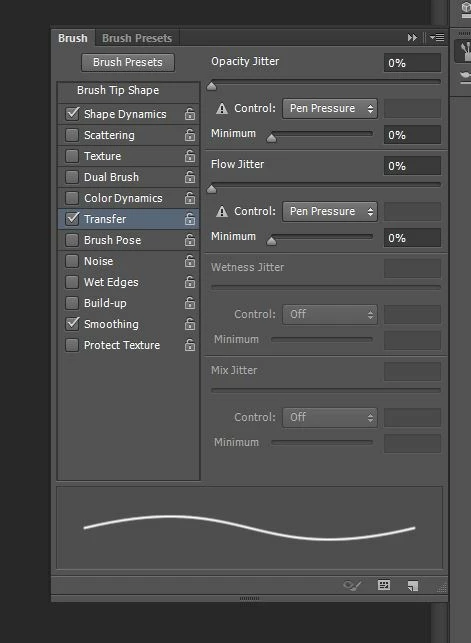
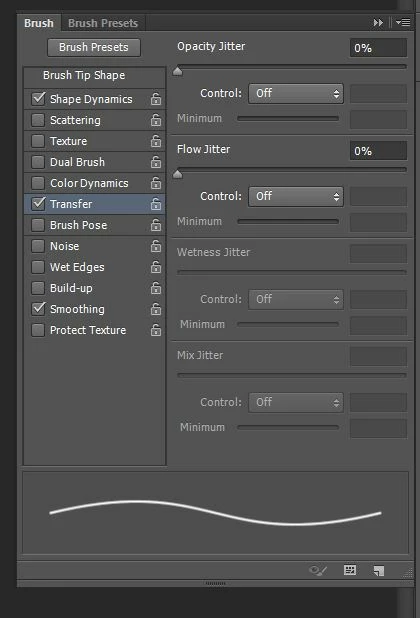
Attached are two screenshots of the brush settings, one with pen pressure on, and one with it off. As you can see, both brush samples look the same, except when the pen pressure is on, there is a little "danger icon" next to it.
 AdChoices