Participant
August 5, 2012
Answered

photoshop detected an error in your display driver- cs6

  • August 5, 2012
  • 2 replies
  • 16460 views

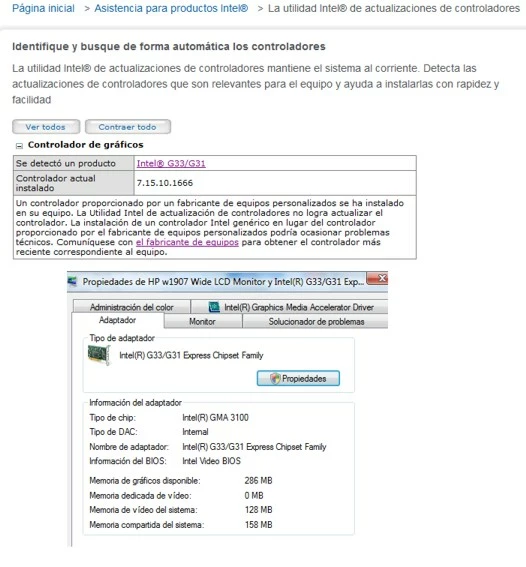
I have a Hp pavilion desktop with an Intel Core2 Duo, I istalled the latest driver but it will not work, is there a solucion to this problem?

Thank you.
    This topic has been closed for replies.
    Correct answer Jeff Arola

    I don't think your card has enough vram for cs6.

    A minimum of 512 mb for video card ram is recommened for cs6 extended and 256 mb of vram for cs6 standard.

    Although some people can get the gpu to work with less.

    I think the major problem is that intel chipset G33/G31, which is not very good at all and kinda dated will never work with photoshop cs6.

    I don't think it even worked with cs4 or cs5 either.

    When i say won't work, you just won't have any gpu driven functions in cs6, but cs6 should work otherwise.

    2 replies

    Participant
    March 8, 2013

    Late to the party but hey.

    I found this on another site and it is the ONLY thing that helped CS6 work for me despite having a good, fully functioning and updated ATI graphics card. Adobe support kept telling me that it was the graphics card. Problem with the graphics card my arse.

    "alright this may help some ppl out as i had to figure it out myself,

    with photoshop cs6 there is a graphics processing system which uses your gpu,

    however mine worked for a day then stopped...

    a file called sniffer_gpu.exe under your adobe program files...

    this basically sniffs out any issues with ur gpu drivers or card, however it seems to find problems which are total "BS"

    FIX...

    simply change the name of the file to sniffer_gpu2.exe (search your adobe files)_(and any problems just change it back to original name)

    i have it working 100% now, no greyed out filters since i made the change how this helps someone else as the net is full of questions on how to fix this issue.

    "

    Chris Cox
    Legend
    March 8, 2013

    Sorry, but you really do have a problem with your GPU or the drivers for it.

    Your workaround is just exposing you to crashes and problems with your video card and it's drivers.

    The GPU Sniffer is there to test the drivers before they can crash Photoshop or show problems, and the sniffer works quite reliably.

    So basically all you are doing is exposing yourself to bugs in the drivers that Photoshop already knows about and was avoiding so you wouldn't crash or get artifacts on screen while working.

    Jeff Arola
    Community Expert
    Jeff ArolaCommunity ExpertCorrect answer
    Community Expert
    August 5, 2012

    I don't think your card has enough vram for cs6.

    A minimum of 512 mb for video card ram is recommened for cs6 extended and 256 mb of vram for cs6 standard.

    Although some people can get the gpu to work with less.

    I think the major problem is that intel chipset G33/G31, which is not very good at all and kinda dated will never work with photoshop cs6.

    I don't think it even worked with cs4 or cs5 either.

    When i say won't work, you just won't have any gpu driven functions in cs6, but cs6 should work otherwise.

    AureaLGAuthor
    Participant
    August 5, 2012

    Thank you so much for your answer Kelly, Can I buy a new video card (which one?) is this possible? or I need a new computer?

    Jeff Arola
    Community Expert
    Community Expert
    August 5, 2012

    Most destops have a slot for an add on graphics (video card) card.

    I'd stick with ATI (Radeon) or Nvidia graphics cards.

    As to which one, there are so many it depends on your budget, but you can certainly get one that will work for under $100.

    I'm sure others wiil chime in with some good recomendations, but you can look at this site to get an idea of the performance of cards in different price ranges:

    http://www.videocardbenchmark.net/
