
Participant
January 7, 2020
Question

Photoshop Freezing During Save For Web (Legacy)

  • January 7, 2020
  • 1 reply
  • 2499 views

Hi all. Have been using Photoshop CC for a good three years now, but for some reason I am having issues with my Save For Web tool now.


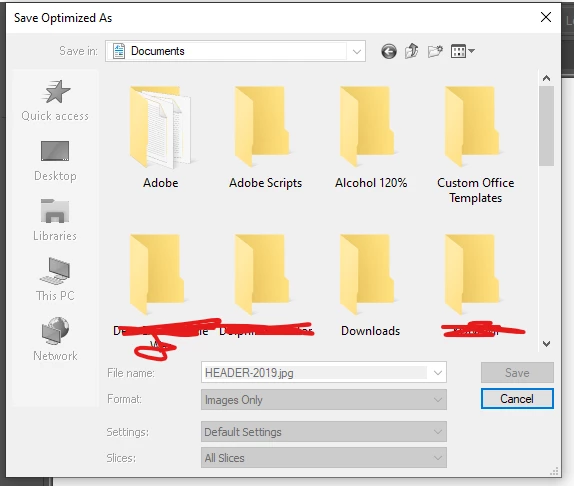
Basically, after making an image and choosing to save it, the Save Optimised As... window opens and I am given the choice to save the image anywhere on my computer. However, any interaction makes Photoshop freeze immediately.


If I select a different folder to save in, or if I even click in the window to go through to another folder, Photoshop will freeze. 


Does anyone know what could be causing this?


I've attached an image of what the freeze looks like, as you can see everything just greys out and then I an't even open Photoshop to cancel or close it.


This topic has been closed for replies.

1 reply

JJMack
Community Expert
Community Expert
January 7, 2020

If this just start to happen where it was working in the before and you have made no updates. Try resetting your Photoshop tools and your User ID Photoshop preferences. If you have made updates What OS version, Photoshop version ad device drivers do you have installed. Posting your Photoshop menu Help>System Info may be helpful.

JJMack
Nemesis_Author
Participant
January 11, 2020

Hi JJ, and thanks for the reply.

I was able to reset my preferences but this did not fix the issue.


However I was not able to find out how to reset my "User ID Photoshop preferences".


I've also pasted my System Info here for you


https://pastebin.com/LNrsxJsP


Hope that helps, I really don't want to cancel my CC sub but might have to if I can't resolve the issue as I rely a lot on this tool for work 😞

JJMack
Community Expert
Community Expert
January 11, 2020

 Your Display's  adapter device driver is also 4 Years old  you should install a newer version

JJMack