
Participant
January 23, 2018
Answered

Photoshop Fullscreen got worse with last update (23/01/2018)

  • January 23, 2018
  • 9 replies
  • 4049 views

I read on the forum that was not only me in the last updates to have problems on the fullscreen re-center bug.

Now, with the last update it got worse and worse.

This is my workspace when I go in fullscreen
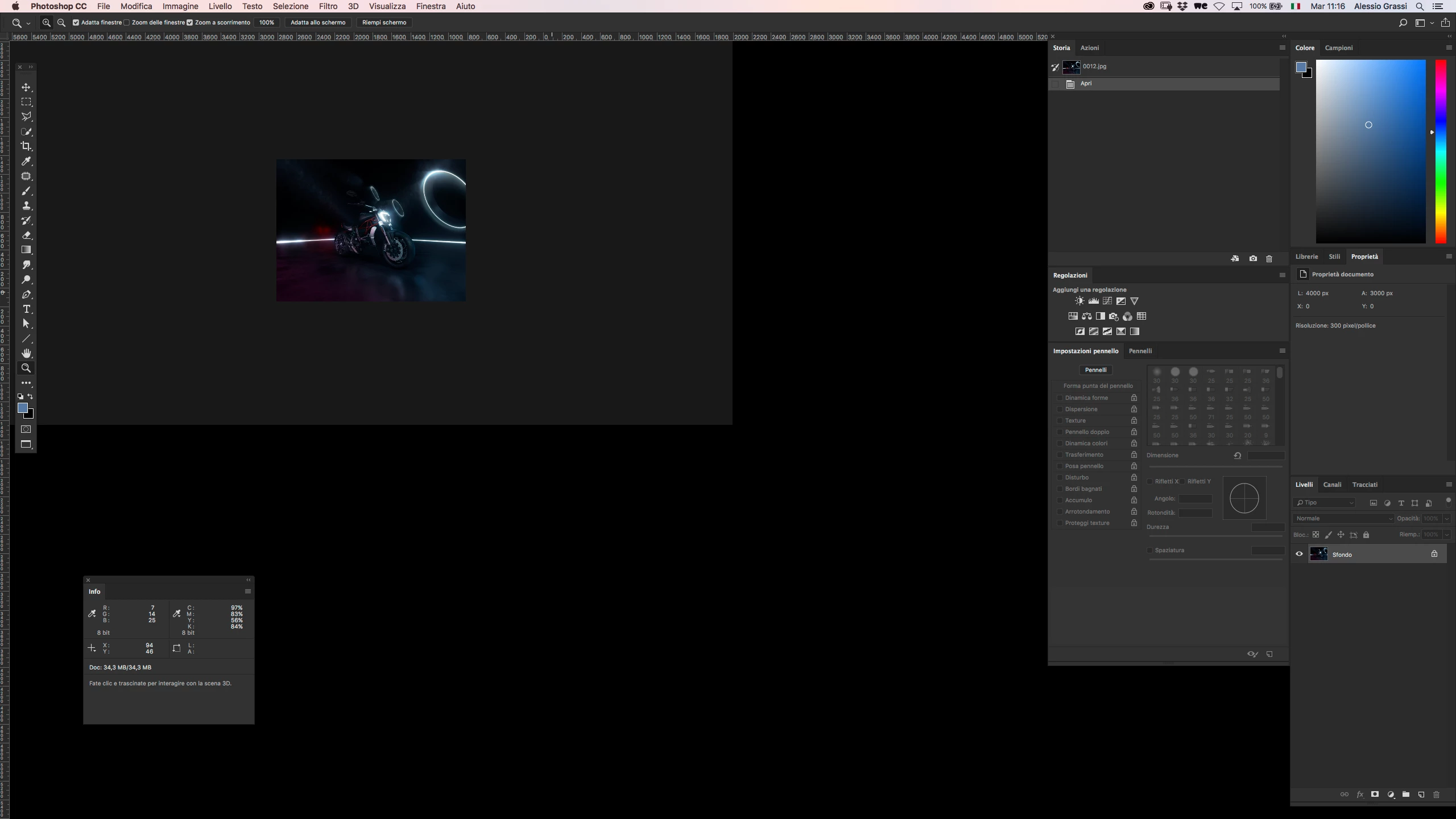
Tried to restart, hoping it was just a bug of my pc, but unfortunately it wasn't.

I'm getting sick and tired of Photoshop problems.. CC2018 killed my workflow, now it got worse.

Get your s**t together Adobe, you're frustrating people.

This topic has been closed for replies.
Correct answer Nicollet

This should be resolved in the update to Photoshop that is now available. Please open your Creative Cloud, update Photoshop and let us know how it goes

Thanks!

Hannah

9 replies

Nicollet
Adobe Employee
NicolletCorrect answer
Adobe Employee
February 13, 2018

This should be resolved in the update to Photoshop that is now available. Please open your Creative Cloud, update Photoshop and let us know how it goes

Thanks!

Hannah

Participating Frequently
February 13, 2018

It is fixed! Hallelujah! Thanks guys!

Participating Frequently
February 13, 2018

Welp, it's not perfect but that particular issue is fixed.

New documents are displayed at 50% which is weird, but I can deal with that.

thanks,

tim

Known Participant
January 24, 2018
SG...
Adobe Employee
Adobe Employee
January 25, 2018

Hi,

We are investigating the issue reported here. Can you try this workaround in the interim?

Press Tab twice to toggle "Hide all tools and panels" on and off.

regards,

steve

Participating Frequently
January 25, 2018

Tried it, it didn't do anything.

Thanks guys.

aXiS_4Author
Participant
January 24, 2018

with the restore preferences I solved the previous FF issue, but more began to happen.. When zooming in non-FF the image kinda duplicates making it impossibile to follow where I was working, until I go cmd+0 to restore the window.

Working with new macbookpro late 17 and High sierra + NEC 27'' Spectraview Monitor, and NO, I don't want to use one screen only because it's not a way to resolve the problem but it's a way where I should ADAPT to the problem.

Problems must be fixed and not adapted to.

Went back to CC 2017, which for now is the more stable CC version.. But I'm so disappointed and frustrated with last updates..

Seems like Adobe is killing professional's workflow..

ir_jl
Participating Frequently
January 24, 2018

Btw our configuration is High Sierra on Late 2017 iMacs with Radeon 580.

Obviously the problem is solved as well if you deactivate "use Graphics Processor" in the preferences.

priyankas72354167

Maybe you are still following this thread. Can you confirm this misbehaviour, is there any usable fix and if not, any idea when this is going to be fixed?

I liked the feature, that the creative cloud app is now able to uninstall former versions of Photoshop when updating to a new version but since the launch of cc2018 I had to go back to cc2017 twice. Pretty bad for a software that claims to be for professionals.

Known Participant
January 24, 2018

Same problem for me running iMac Pro 10.13.3, Photoshop 19.1 and Wacom 6.3.27-2.

Participant
January 23, 2018

Have this too since today's update, deleting preferences didn't work. What temp fixed it for me was using the default tab settings.

i don't like working that way so installed a 2017 version; hope this gets solved soon.

Participant
January 23, 2018

By the way also duo monitor, macbook pro 2017 & Eizo 27inch.

Participating Frequently
January 23, 2018

I am only experiencing this when i have multiple monitors connected BTW.  One of my screens is a MacBook pro retina screen, the other is a 1080p screen.

Participating Frequently
January 23, 2018

This is unbelievable... i have been waiting for months for the centering fix come, and when it finally does, the problem is even worse!  You can press tab 2x after going into full screen mode and it fixes it... but you have to do that every time you enter full screen mode.

Checking "Use Application frame" is not an acceptable workaround.  Using the application frame fixed the previous issue, but i don't want to work that way.  How many months until this is addressed?

priyankas72354167
Adobe Employee
Adobe Employee
January 23, 2018

Hi

Reset the preferences of Photoshop.

To restore preferences quickly using a keyboard shortcut: Press and hold Alt+Control+Shift (Windows) or Option+Command+Shift (Mac OS) as you start Photoshop. You are prompted to delete the current settings. The new preferences files are created the next time you start Photoshop.

Regards

Priyanka

ir_jl
Participating Frequently
January 23, 2018

Hi Priyanka,

thanks for your reply. Resetting preferences does indeed help.

But just until you deactivate "window -> application frame". Then it's damaged again!

This problem affects MacOs cpomputers only because Windows doesn't have the option to work without application frame.

For us it's quite annoying though. I hate this window in a window in a window UI.

It's incredible! Updating Photoshop has become a constant threat to any professional workflow! Damn, I don't know any other app for DTP or graphic design that developed so badly during the last 5 years. A lot of useless stuff added, only few major improvements on the core functions, horrible license management and so on...

I guess quite a few people are just waiting for apps like Affinity Photo to become a stable alternative for professional use...

Known Participant
January 23, 2018

Experiencing the same issue and frustrations with the last several updates to Photoshop. Seems to only effect me when running dual monitors as turning off one display resolves the issue. Also it appears the laggy mouse cursor when using the move tool bug hasn't been resolved either.