

waseem103
Inspiring
March 30, 2017
Beantwortet

Photoshop generating empty folders on local disk

  • March 30, 2017
  • 1 Antwort
  • 1408 Ansichten

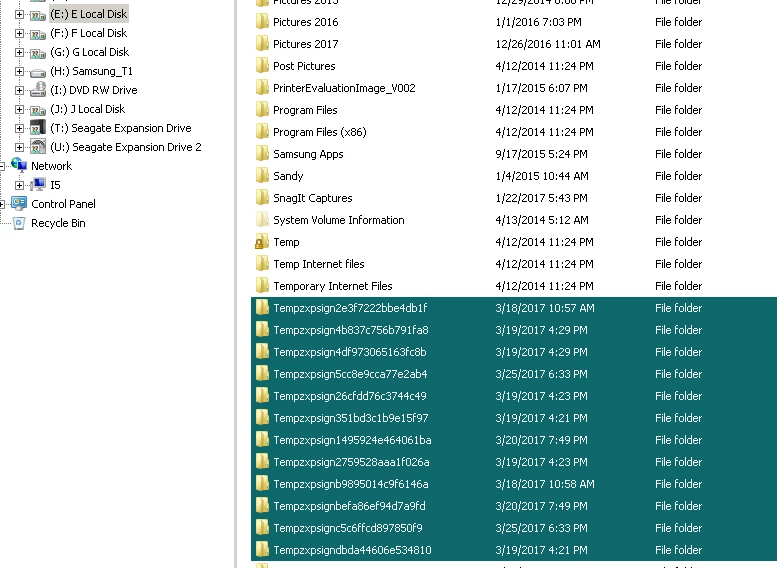
Photoshop generates tens of empty folders.

these folders are named some thing like this:

469b6e201d28e9c1b019ce47c31ca1

d4e2792b87c631731d4951f63e

Located on "local disk F:\"

also these folders can not be neither deleted nor opened but to provide administrator permission

--------

I go to Preferences > Scratch Disks

then unchecked the checkbox of F:\ to deactivate it.

nothing happen 😕😕
Dieses Thema wurde für Antworten geschlossen.
Beste Antwort von Just Shoot Me

I don't install any third-party or add-ons.

I'm not completely sure if is it Photoshop creates them or another software !!

but they just created only when i'm diving in Photoshop.

once i close Photoshop nothing happen


This is a bug in the newer versions of PS. It has been reported several times. I get them also but on my E:\ drive.

Just Delete them once PS is closed.

1 Antwort

Trevor.Dennis
Community Expert
Community Expert
March 30, 2017

These are folders and not temp files?

What operating system are you using, and what version of Photoshop?

waseem103
Inspiring
March 30, 2017

Windows 10 Education

Adobe Photoshop Version: 2017.0.0

-----

they are not temp files

they are (read only) and (0 bytes) folders

they just appear only when i use Photoshop.

Trevor.Dennis
Community Expert
Community Expert
March 30, 2017

OK.

So :F\ is your primary Scratch drive?

Are they hidden files?  (Do you have file explorer View Options set to show Hidden files?)

I am using Windows 10, and I can't actually remember Photoshop creating folders.  I just pushed a file up to 40,000 pixels wide to force a decent temp file which produced this:

View is set to show Hidden files and file extensions.

Our JJ Mack is good with Windows 10, so we'll see if he has any thoughts?

JJMack