
Participant
November 6, 2019
Question

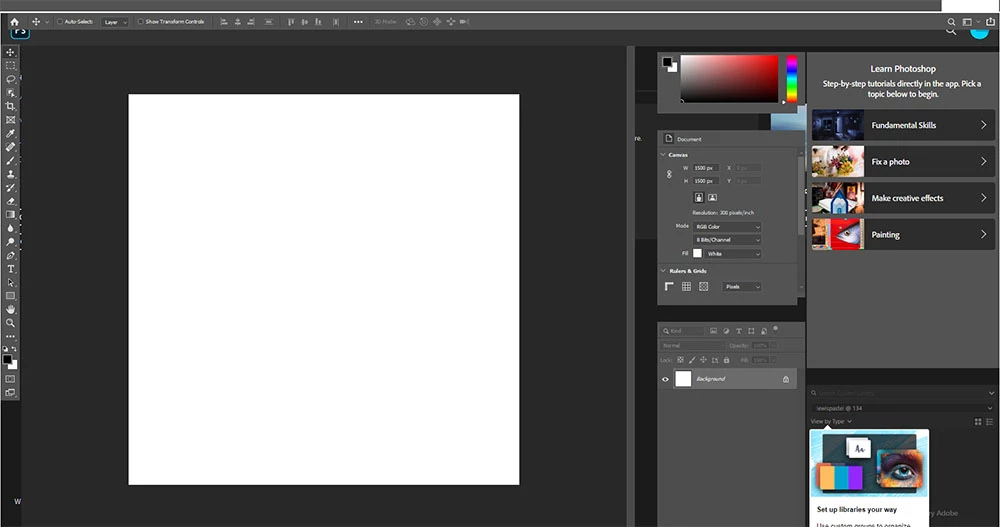
Photoshop not loading completely (menubar and tiles)?

  • November 6, 2019
  • 2 replies
  • 1906 views

Hello,


After updating my Photoshop to Photoshop 2020, it seems that certain aspects of the program aren't loading (an issue I've never experienced on the same laptop with earlier versions).


I've tried various things to try and get it to work, such as resetting my preferences and re-installing Photoshop all together, and it still doesn't work. I also read somewhere it might be Windows, but I'm unable to go back to an earlier version. I'm able to work on projects, but not being able to move between files or close down a file is super frustrating. 


Does anyone have a solution or advice? 


Kristin

This topic has been closed for replies.

2 replies

mathiash18421305
Participating Frequently
April 22, 2020

Same problem here. Hope they solve this issue as soon as possible...

JJMack
Community Expert
Community Expert
November 6, 2019
Participant
November 6, 2019

Thanks for the links, JJMack. 


I tried the suggested solutions  —  I updated my drivers & restarted the computer, have my dispay scaling set to recommended, closed all applications and opened Photoshop alone, as well as unticking the "Auto show the Home Screen". None of the solutions are working. 


Any other suggestions as to what to do, would be appreciated.

JJMack
Community Expert
Community Expert
November 9, 2019

Reset your workspace I have seen some post that the home workspace seems to be un-docked and is covering Photoshop main window.  I was not able to find a way to un-dock it on my windows 10 system. However the post I have seen were on Windows.

However, in your case it looks like the Tool option bar, tool bar and palettes are on top of the home workspace. This is the first one like that I have seen. Or you have un-docked the tool bars and other palette and perhaps have a screen capture in a window or tab. Not a normal setup


JJMack