TC Conner
Known Participant
October 2, 2018
Answered

Photoshop opens after I restart my iMac

  • October 2, 2018
  • 2 replies
  • 1689 views

When I restart my iMac (macOS Mojave Version 10.14) Photoshop opens. The PS app in my dock IS NOT checked to "Open at Login."

Photoshop IS NOT listed in "Login Items" in Users & Groups so I cannot deselect it using the "-" there.

is there something in Photoshop Preferences that I need to change?

Thanks.

TC
This topic has been closed for replies.
Correct answer Jeff Arola

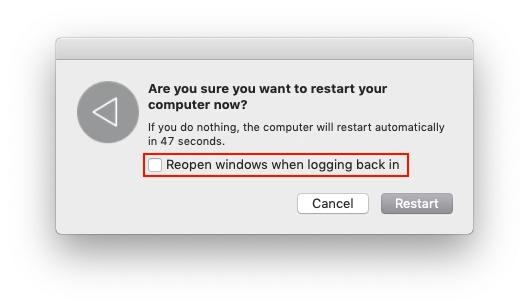
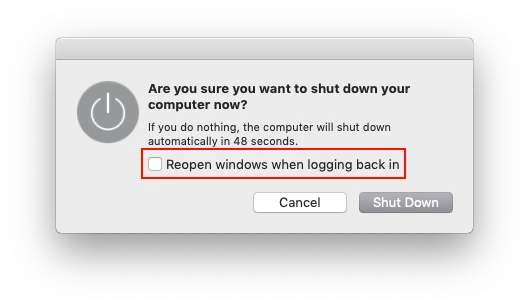
When you Shut Down or Restart your mac you should see the following dialog.

Make sure Reopen windows when logging back in is unchecked.

2 replies

jane-e
Community Expert
Community Expert
October 2, 2018

Make sure you have actually Quit Photoshop.

The default for Mac is to reopen applications when you re-start. You can disable this in System Preferences.

Automatically re-open windows, apps, and documents on your Mac - Apple Support

Is that what is happening?

TC Conner
TC ConnerAuthor
Known Participant
October 2, 2018

No, that is not what is happening. Photoshop opening after a restart only began after I upgraded to Mojave.

TC Conner
jane-e
Community Expert
Community Expert
October 3, 2018

tcc63791338  wrote

No, that is not what is happening. Photoshop opening after a restart only began after I upgraded to Mojave.

Hi TCC, I realize that and that’s why I thought Mojave might have reset that preference. If you confirmed Photoshop was Quit properly  and if you also checked the System preference, then it could be a bug.

Does it happen with any other programs?

Akash Sharma
Legend
October 2, 2018

Hi there,

Sorry that Photoshop is launching after you restart your computer. As you've mentioned that it is not in the "open at login" items. Please check there is no other file associated with Photoshop in the "Open at login" menu, it could be an image or PSD file.

Also, which version of Photoshop are you using and have you started noticing this issue post the OS update to Mojave?

Thanks,

Akash

TC Conner
TC ConnerAuthor
Known Participant
October 2, 2018

There are not files associated with Photoshop in my open at login under my user name in Users & Groups. I am subscribed to Adobe's Creative Cloud Photography Plan so I am running the latest versions of both Photoshop CC and Lightroom Classic CC.

TC Conner
Jeff Arola
Community Expert
Jeff ArolaCommunity ExpertCorrect answer
Community Expert
October 2, 2018

When you Shut Down or Restart your mac you should see the following dialog.

Make sure Reopen windows when logging back in is unchecked.