

Photoshop repeatedly asking me to sign back in, and re-activate computer that's already activated
I am also having Acrobat X ask me to sign in often, but photoshop is doing it far more.
I have the creative cloud app installed. Photoshop and Acrobat were installed via this.
This computer is shut down every night and fully rebooted the next day.
When I open up photoshop, say 4 days out of 7, it asks me to sign in, and then it tells me I've reached my activation limit and have to sign out of one other computer.
The weird thing is I only have it installed on the desktop and laptop, the laptop is hardly ever used for photoshop (it's weeks and weeks since I last opened photoshop on the laptop), so photoshop is really only ever launched on the desktop machine.
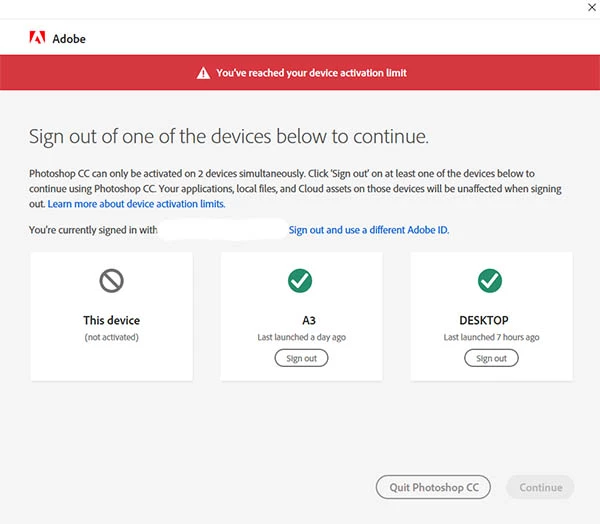
The activation screen sees the desktop and the laptop, and I'm working on the desktop, but it doesn't seem to recognise that I'm starting photoshop on the same machine as last time so asks me to sign out of DESKTOP so that I can sign into DESKTOP.
Here's the activation screen during this process.
DESKTOP is the same machine as "This device". The one in the middle is the laptop and I don't have any trouble with that.
I've contacted adobe support via chat twice over this but they were useless. Last thing tried was a command line tool to uninstall creative cloud app and all adobe products, but it failed to remove anything but creative cloud, and I have since removed photoshop and acrobat, reinstalled creative cloud and both programs, but still no luck.
Anyone know what's going on here? I'm getting tired of having to do all this stuff just to get into photoshop.
 AdChoices