

Photoshop Script to Save File One Folder up and in Another.
Hiya,
I'm working on piecing together a script for Photoshop that will take my current open photo (high res .psd) and duplicate it (without 'copy' being appended) - which I have done... and I have it currently able to save the .jpg in the folder next to the source .psd I've been working on.
What I'd really like is for the script to be able to look at the path where the .psd is, go up the tree one, then into the "web" folder and save the .jpg there.
example folder structure for each session:
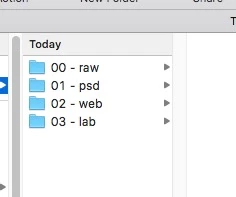
so while working the .psd I want to assign an action with F key to run the script... and then the script will duplicate the document and save is in the "02 - web" folder.
Currently I have it working, but only to save next to the original .psd and here's the code I have (modified from pieces of script found around the web)
//Duplicate doc
var doc = app.activeDocument
var fname = doc.name.split(".")
var fname = fname[0]
var newDoc = doc.duplicate(fname)
//save the jpg
if (app.documents.length > 0) {
var thedoc = app.activeDocument;
var docName = thedoc.name;
if (docName.indexOf(".") != -1) {
var basename = docName.match(/(.*)\.[^\.]+$/)[1];
} else {
var basename = docName;
}
//getting the location, if unsaved save to desktop;
try {
var docPath = doc.path;
} catch (e) {
var docPath = "~/Desktop";
}
var jpegOptions = new JPEGSaveOptions();
jpegOptions.quality = 10;
jpegOptions.embedColorProfile = true;
jpegOptions.matte = MatteType.NONE;
var filename = docPath + '/' + basename + '.jpg';
thedoc.saveAs((new File(filename)), jpegOptions, true);
};
any help with how to get it to go up the tree and into that folder would be greatly appreciated.
Then after that, phase 2 would be to see if I could get it to use the "JpegMini Pro" plugin to save the .jpg - or at least "save for web" and not the straight "save as" - but jpegmini pro is preferred (that one might be hard, I don't know)
 AdChoices